

Top
Author
Published
9 Dec 2025Form Number
LP2271PDF size
34 pages, 5.8 MBSubscribed to LP2271.
Thank you for your feedback.
Table of Contents
- Rack installation
- Physical specifications
- Operating environment
- Warranty upgrades and post-warranty support
- Services
- Lenovo TruScale
- Regulatory compliance
- Interoperability
- External storage systems
- External backup units
- Rack cabinets
- Power distribution units
- Uninterruptible power supply units
- Seller training courses
- Related publications and links
- Related product families
- Trademarks
Abstract
The Lenovo X8 Directors are based on Brocade Gen 8 Fibre Channel is a purpose-built storage network that secures, automates, and powers today’s storage infrastructure. It offers up to 128G per port performance, advanced security, and embedded SAN AI technology to protect SAN fabrics from cybersecurity threats, automate infrastructure management, and support enterprise AI and modern workloads.
The X8 Director provides a robust and scalable foundation with uncompromising security, ultra-low latency, and 128G links for mission-critical and enterprise AI workloads. With proven reliability, seamless scalability, integrated security, and embedded AI technology, the X8 Director maximizes the performance, security, and efficiency of storage investments.
This product guide provides essential pre-sales information for technical specialists, sales specialists, sales engineers, IT architects, and other IT professionals. It covers the X8 Directors, their key features, specifications, components, options, and configuration guidelines, helping users understand and consider their application in IT solutions.
Introduction
The Lenovo X8 Directors are a modular platform designed for large-scale storage environments, providing a stable, scalable, and high-performance storage networking foundation. It supports growth, workload consolidation, and reliable operations, making it ideal for mission-critical and enterprise AI workloads.
With up to 384 × 128G ports, the X8-8 Director offers exceptional bandwidth and throughput, crucial for supporting a growing number of devices, applications, and workloads without compromising performance. Its high bandwidth and ultra-low latency eliminate I/O bottlenecks, maximizing performance for high-transaction workloads and next-generation storage. This performance headroom allows organizations to consolidate workloads onto fewer systems. To further maximize utilization, up to 128 UltraScale ICL links allow the director to scale efficiently with fewer chassis by preserving device ports for device connectivity. The X8 Director also provides flexible deployment options, multiprotocol support, and mixed-blade capability, allowing organizations to adapt their infrastructure to optimize resources and meet evolving storage and server requirements.
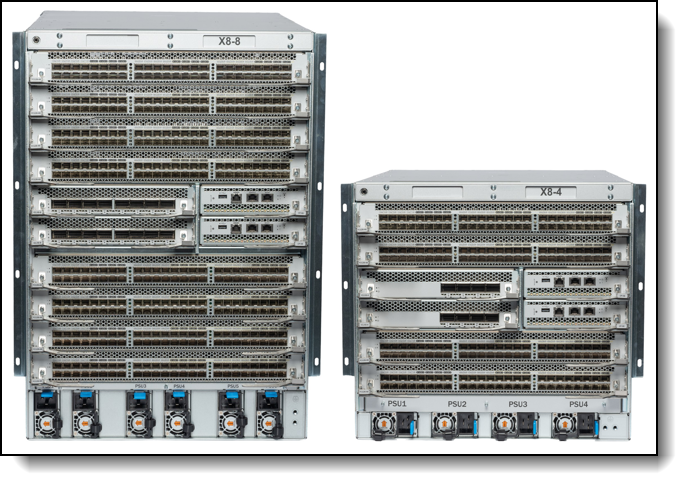
Figure 1. Lenovo Gen 8 Director X8-8 (left) and X8-4 (right)
Did you know?
The Lenovo X8 Directors boasts a cyber-resilient, quantum-safe architecture, protecting SAN data and applications from quantum computing and cybersecurity threats. Lenovo and Brocade secure storage traffic with Fibre Channel isolation and role-based access controls, preventing unauthorized access. The switch uses hardened Fabric OS and hardware, validating hardware and software roots of trust to ensure only authenticated components operate, reducing the risk of hijacking and malicious software installation.
Key features
The X8 Directors lay the foundation for the autonomous SAN. With autonomous SAN technology, the director harnesses the power of analytics and the simplicity of automation to optimize performance, ensure reliability, and simplify management. Leveraging these capabilities enables organizations to realize a self-learning, self-optimizing, and self-healing SAN.
The X8 Directors offer the following features and benefits:
- Scale more devices, applications, and workloads with up to 384 x 128G ports per chassis
- Maximize VM and application density with industry-leading 128G bandwidth for unmatched efficiency and utilization
- Enable faster response time and enhance user experience of enterprise AI and critical workloads with unmatched low latency
- Scale out efficiently using fewer chassis with up to 128 UltraScale ICL links, without sacrificing device ports
- Protect critical information from quantum computing and cybersecurity threats with advanced cryptographic algorithms, enhanced access controls, and integrated security
- Eliminate time-consuming, manual correlation of all application resources
- Learn and adapt to changing application demands by dynamic load balancing across virtual channels
- Simplify complex telemetry into actionable insights to improve performance, reduce downtime, and simplify operations
- Automatically monitor fabric behavior, detect anomalies, and self-correct before issues impact performance
- Design flexible architectures to increase agility with concurrent Fibre Channel, NVMe, or FICON storage connectivity
Additionally benefits of the X8 Directors are:
As workloads become more demanding and cyber threats more sophisticated, fortifying the storage network against hidden risks is essential. The network must deliver optimal performance, operate autonomously, streamline management, and protect critical data.
The X8 Directors, featuring Brocade Gen 8 technology, combines 128G performance, quantum-safe security, and AI-powered autonomy, creating a robust foundation for modern data center architectures. Integrated quantum-resistant encryption safeguards SAN fabrics against cybersecurity threats in the era of quantum computing. Embedded SAN AI technology modernizes SAN management, enabling autonomous and efficient SAN operations.
By hardening the SAN against evolving security risks and enabling AI-powered autonomy to learn, adapt, and respond, Brocade Gen 8 delivers the most secure, intelligent, and high-performance network for storage. This leads to faster decision-making, improved operational efficiency, and high levels of resiliency.
Engineered to meet continuous data growth and demanding application requirements, the X8 Director's modular design provides the capacity, throughput, and resiliency needed for all-flash and NVMe workloads in large-scale Fibre Channel storage environments, while enabling flexible, scalable SAN architectures.
The X8 Directors safeguard SAN fabrics with quantum-resistant 256-bit encryption and advanced cryptographic algorithms. Its Post-Quantum Cryptography (PQC) algorithms resist quantum attacks, protecting sensitive data from future quantum computers. Brocade Gen 8 also hardens the SAN hardware and software, minimizing attack surfaces with strong access controls and limited privileges using the principle of least privilege. This architecture grants minimal necessary access, strengthening security and reducing vulnerabilities.
Brocade SANnav Management Portal enhances security by capturing MAPS alerts for real-time monitoring of SAN security configuration, fabric health, and performance. It automates security assessments and maintains best practices, alerting on inconsistencies.
Brocade Gen 8 technology maximizes network uptime, simplifies SAN management, and provides unprecedented visibility and insight. The X8 Director, with embedded SAN AI, automates application infrastructure management and offers a robust analytics architecture, reducing manual administration. This ensures a resilient network that remains stable and efficient as workloads and infrastructure complexity grow. Brocade Gen 8 modernizes SAN management with AI-powered autonomy developed over three decades.
The Brocade SAN Fabric Intelligence (SAN FI) feature eliminates manual correlation of application resources by combining monitoring, troubleshooting, and cross-correlation of servers, storage, VMs, and fabric connections. This provides end-to-end visibility for all connected devices and components, accelerating troubleshooting and driving smarter management decisions. This automation aids understaffed IT teams, providing faster response times than humans.
Gen 8 self-optimizing capabilities use actionable intelligence to maximize performance. Real-time monitoring enables smarter decisions on traffic prioritization, congestion management, and notification, ensuring optimal network performance. Brocade Adaptive Traffic Optimizer guarantees critical application performance by automatically prioritizing traffic. It dynamically adapts to traffic changes, classifying and separating traffic with similar characteristics and isolating adversely impacting flows to avoid application performance issues.
Gen 8 leverages extensive data collection and powerful analytics to understand environment health and performance, identifying potential impacts or trending problems. Built-in intelligence collates millions of data points into actionable insights, improving performance, reducing downtime, and simplifying operations. Autonomous SAN features monitor fabric behavior, detect anomalies, and self-correct before performance is impacted.
Components and connectors
The X8-4 Director is a 9U rack mount chassis that is built for midsize networks. It has four horizontal blade slots to provide up to 192 ports for device connectivity. The optional X8-4 UltraScale ICL blades provide the equivalent to 64 x Gen 8 ports for chassis-to-chassis interconnect.
The X8-8 Director is a 14U rack mount chassis that is built for large enterprise networks. It has eight horizontal blade slots to provide up to 384 ports for device connectivity. The optional X8-8 UltraScale ICL blades provide the equivalent to 128 x Gen 8 ports for chassis-to-chassis interconnect.
In this section:
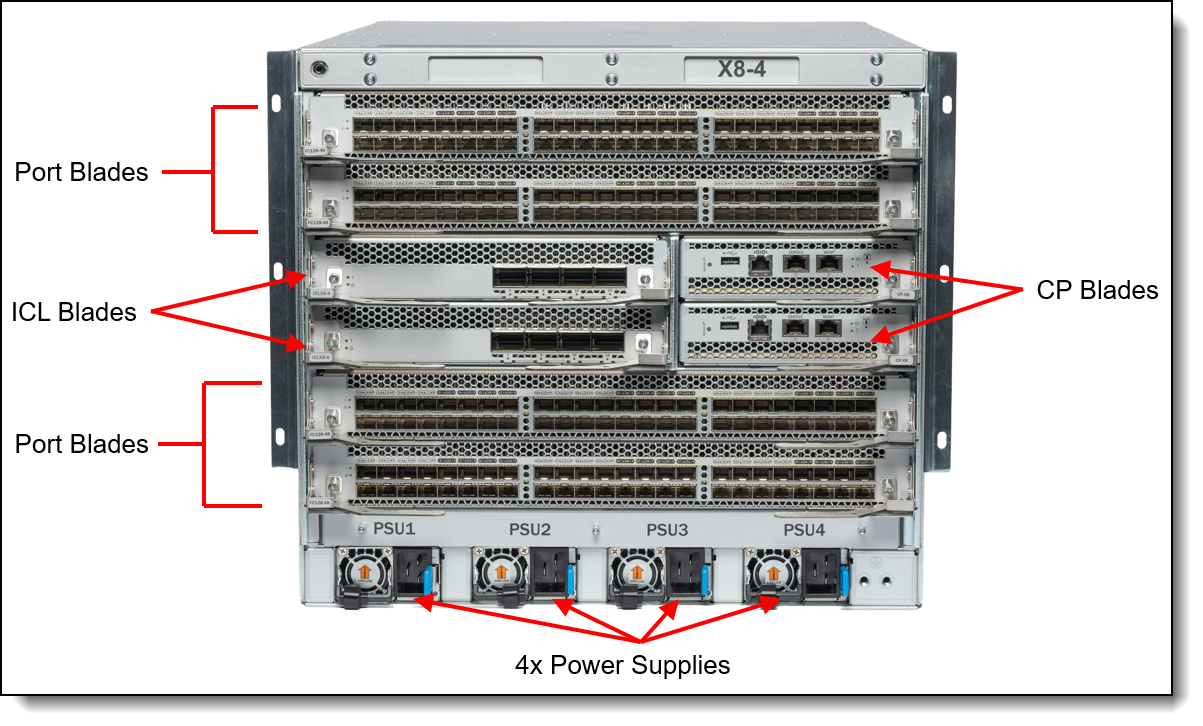
The port side of the X8-4 chassis has the following components:
- Four blade slots within the X8-4 chassis can be populated with optional port blades. The chassis comes without port blades, see Blades for ordering information.
- Two redundant hot-swap active/standby Control Processor blades (CP blades come with the chassis). The Control Processor (CP) blade operates the control plane for the director, hosts the Fabric OS (FOS) that manages all Director hardware, and provides the following external connections for device configuration, firmware downloads, service, management, and monitoring functions:USB port for firmware downloads and technical support data
- Serial console RJ-45 port
- 10/100/1000 Mb Ethernet RJ-45 port for device management and configuration
- 10/100/1000 Mb Ethernet RJ-45 port for service
- 10 Gb Ethernet RJ-45 port (reserved for future use)
- Note: The two 10/100/1000 Mb Ethernet ports are configured in an active/standby pair.
- Two Core routing blades (CR128-4) come standard and allow switching between the port blades. They are installed on the non-port side of the chassis, behind the fans. Core routing blades contain ASICs that allow switching up to four port blades. Core routing blades connect to port blades through Fibre Channel ports through a high-speed connector. Each core routing blade provides 96 Gen 8 FC ports for the port blade connection.
-
Two optional ICL (Inter-Chassis Links) Blades are available and provide chassis-to-chassis connections without using devices ports. ICL slots to ship from factory with filler panels installed.
- Four modular, hot-swappable 3000W AC power supplies (100–240 VAC autosensing), 2+2 or N+N redundancy. Choice of airflow Non-Port side Intake (NPI) or Non-Port side Exhaust (NPE):
- AC power supply model supporting NPI provides up to 3000W (100–240 VAC). This assembly has one fan that moves the air from the port-side to the port side of the device.
- AC power supply model supporting NPE provides up to 3000W (100–240 VAC). This assembly has one fan that moves the air from the port side to the non-port side of the device.
The following figure shows the non-port side view of the X8-4 FC SAN Director.
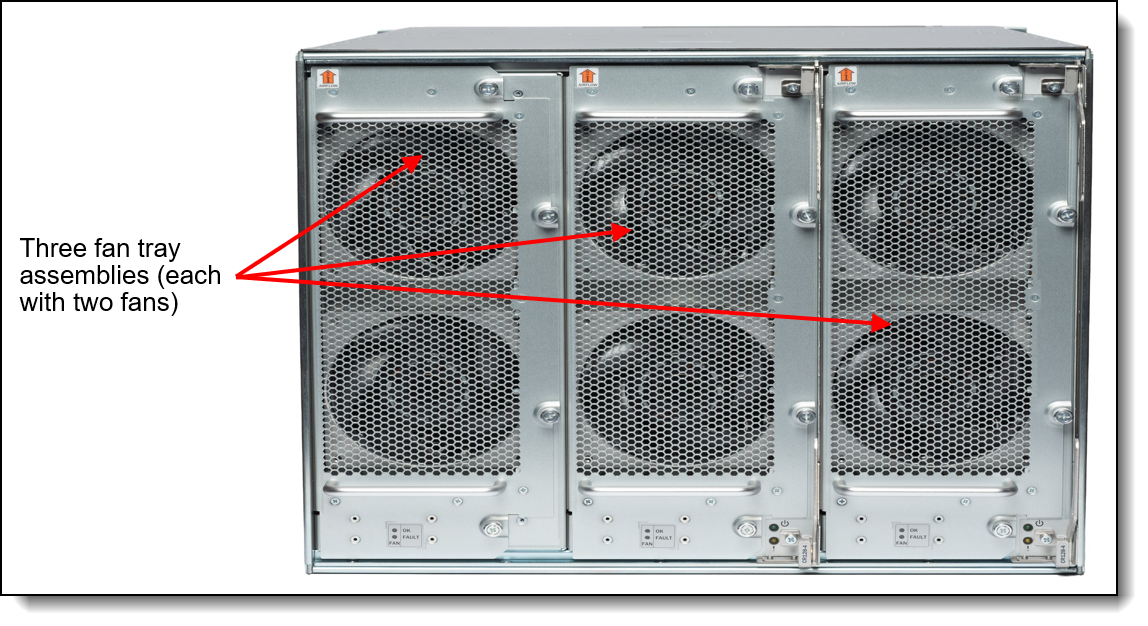
Figure 3. X8-4 FC SAN Director non-port side view with 3 Fan assemblies
The non-port side of the X8-4 chassis requires three hot-swappable rear-mounted Fan Assemblies for 2+1 redundancy, which must be ordered together with the chassis. Each fan assembly contains two fans for a total of six fans for three installed fan assemblies. One fan assembly can be hot swapped at a time. Customers have the choice of airflow NPI or NPE but they must match the power supplies selected.
- Non-port side air intake (NPI) moves the air from the non-port side to the port side of the device.
- Non-port side air exhaust (NPE) moves the air from the port side to the non-port side of the device. More common in Telco deployments.
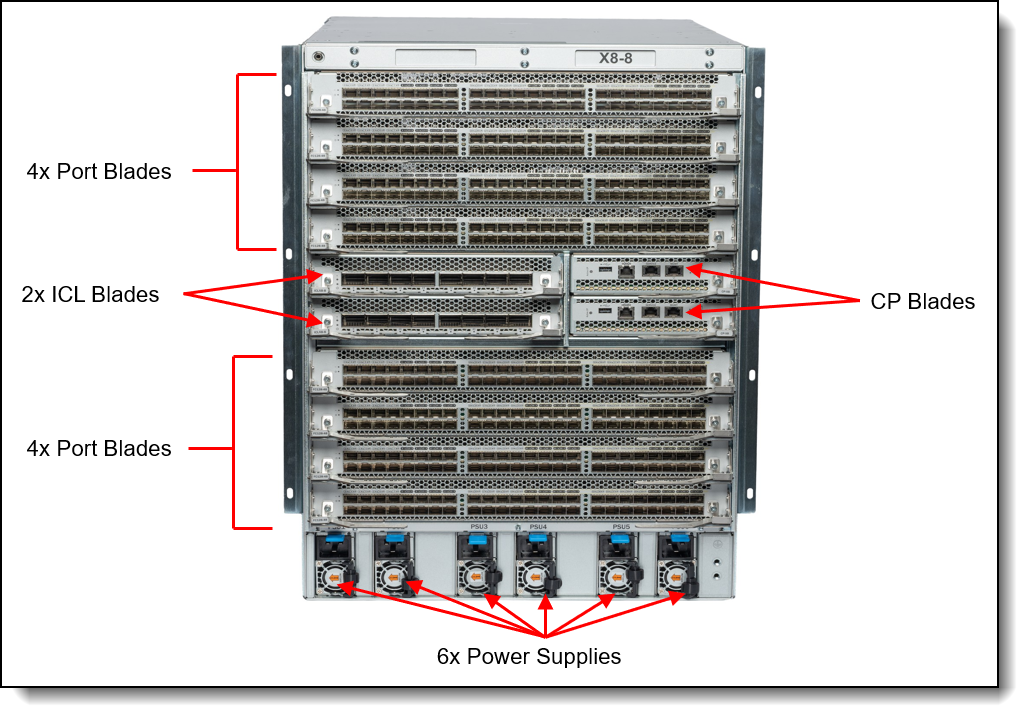
The port side of the X8-8 chassis has the following components:
- Eight blade slots within the X8-8 chassis can be populated with optional port or extension blades. The chassis comes without port blades or extension blades, see Blades for ordering information.
- Two redundant hot-swap active/standby Control Processor blades (CP blades come with the chassis) A Control Processor (CP) blade contains the control plane for the device and hosts the Fabric OS that manages all hardware within the device, and it provides the following external connections for device configuration, firmware downloads, service, management, and monitoring functions:
- USB port for firmware download and technical support data
- Serial console RJ-45 port
- 10/100/1000 Mb Ethernet RJ-45 port for device management and configuration
- 10/100/1000 Mb Ethernet RJ-45 port for service
- 10 Gb Ethernet RJ-45 port (reserved for future use)
- Note: The two 10/100/1000 Mb Ethernet ports are configured in an active/standby pair.
-
Two Core routing blades (CR128-8) come standard and allow switching between the port blades. They are installed on the non-port side of the chassis, behind the fans. Core routing blades contain ASICs that allow switching up to eight port blades. Core routing blades connect to port blades through Fibre Channel ports through a high-speed connector. Each core routing blade provides 192 Gen 8 FC ports for the port blade connection.
- Two Optional ICL (Inter-Chassis Links) Blades are available and provide chassis-to-chassis connections without using devices ports. ICL slots to ship from factory with filler panels installed.
- Six modular, hot-swappable 3000W AC power supplies (100–240 VAC autosensing), 3+3 or N+N redundancy. Choice of airflow NPI or NPE.
-
AC power supply model supporting NPI provides up to 3000W (100–240 VAC). This assembly has one fan that moves the air from the port-side to the port side of the device.
-
AC power supply model supporting NPE provides up to 3000W (100–240 VAC). This assembly has one fan that moves the air from the port side to the non-port side of the device.
-
The following figure shows the non-port side view of the X8-8 FC SAN Director.
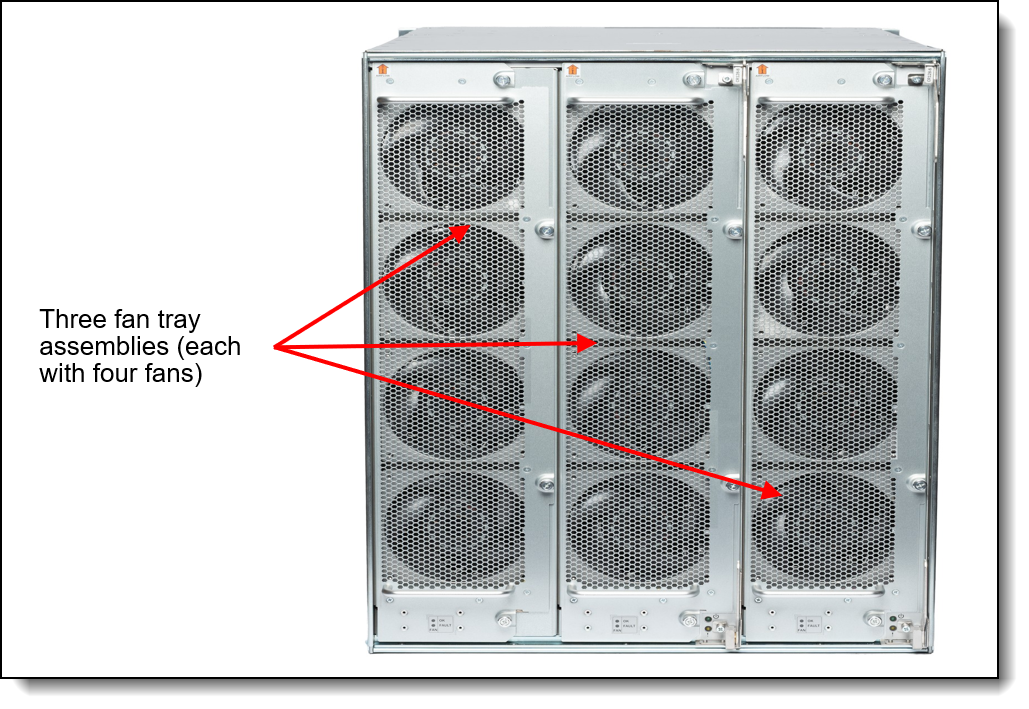
Figure 5. X8-8 FC SAN Director non-port side view
The non-port side of the X8-8 chassis requires three hot-swappable rear-mounted Fan Assemblies for 2+1 redundancy, which must be ordered together with the chassis. Each assembly contains four fans for a total of 12. One fan assembly can be hot swapped at a time. Customers have the choice of airflow NPI or NPE but they must match the power supplies selected.
- Non-port side air intake (NPI) moves the air from the non-port side to the port side of the device.
- Non-port side air exhaust (NPE) moves the air from the port side to the non-port side of the device. More common in Telco deployments.
Port Blades Blades
The following figure shows the Gen 8 FC128-48 port blade.
Figure 6. Gen 8 FC128-48 port blade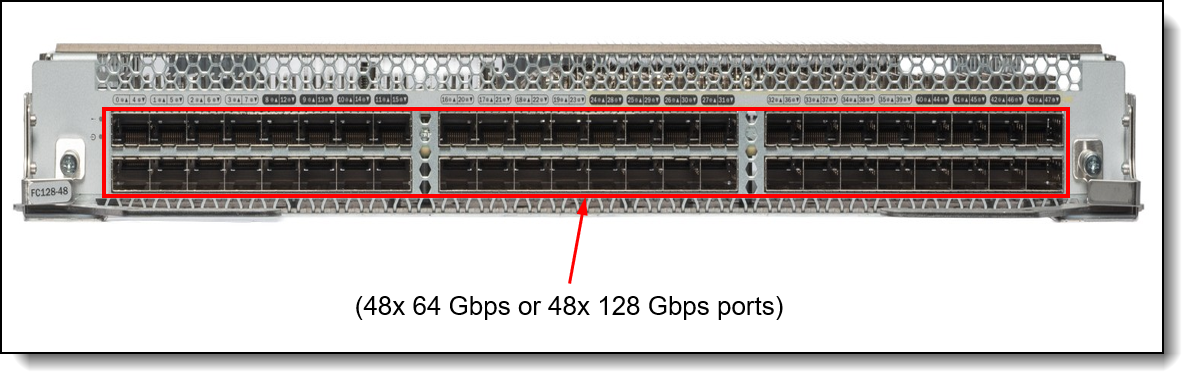
There are multiple 48-port blades offerings. These blades contain 48 ports capable of Fibre Channel speeds up to 128 Gbps depending on model and support up to 192 128Gbps external ports in a single X8-4 chassis, and up to 384 128 Gbps external ports in a single X8-8 chassis. While most clients leverage SWL transceiver models, LWL models are available for those mainframe-connected environments or those needing connectivity over longer distances.
- The Gen 8 FC128-48 Fibre Channel port blade provides 48 x 64G or 48 x 128G Fibre Channel ports with backward-compatibility support for 16, 32, and 64G Fibre Channel connectivity using the 64G SFP+.
System specifications
The following table lists the X8-4 and X8-8 FC SAN Director system specifications.
Note: The supported hardware options and firmware features listed in this product guide are based on the Fabric OS version 10.X.
Models
he following table lists the X8-4 and X8-8 FC SAN Director Models.
The X8-4 and X8-8 Gen 8 FC SAN Director part numbers include the following items:
- One Director chassis that contains the following components:
- Two Control Processing (CP) blades
- Two Core Routing (CR) blades Internally Mounted
- Enterprise Bundle & Integrated Routing SW license installed
- Ground lug kit
- Wrist strap
- 4-post adjustable (27"-31") rack mount Kit
- X8-4 or X8-8 specific vertical cable management comb
Configuration notes:
- Models come standard with CR blades, however in order to leverage the ICLs, optional ICL blades are required. See the Inter-Chassis Links section for details.
- Models do not include port blades and will need to be ordered for the Director model. See the Blades section for details.
- Models do not include fan modules or power supplies and must be ordered together with the Director model. See Cooling and Power supplies and cables for details.
- Models do not include power cords and must be ordered together with the director model. See Power supplies and cables for details.
Port-Blades
The X8-4 and X8-8 FC SAN Directors support the port blade options that are listed in the following table.
Blades can be mixed, but the maximum is four for the X8-4 and eight for the X8-8.
Port blades come standard with all ports activated. They also include a specific number and type of transceivers, as indicated in the description of each part number. Additional transceivers and cables can be ordered. See Transceivers and cables for details.
Inter-Chassis Links (ICL) Blades
ICL blades are optional for the X8 Directors. These blades allow organizations to seamlessly scale out their storage environments. Brocade UltraScale chassis connectivity leverages optical inter-chassis links (ICLs). These links can connect up to 12 Brocade Gen 7 or Gen 8 directors, enabling flatter, faster, and simpler fabrics that increase consolidation while reducing network complexity and costs.
UltraScale ICLs use Octal Small Form-factor Pluggable (OSFP) media and enable scalable core-edge and active-active full mesh chassis topologies. These high-density chassis topologies reduce Interswitch cabling by 87.5%. UltraScale ICL connections reside on the core routing blades instead of consuming ports on the port blades, enabling up to 33% more device ports for server and storage connectivity. This maximizes overall port density within the smallest amount of rack space while freeing up front-facing device ports for server and storage connectivity.
ICL blades are sold in pairs and include transceivers that populate half of the ports. ICL upgrade kits are available for those wanting more ports (4 OSP transceivers are included, no POD licenses are required for any ports for simpler deployment). Clients have a choice of 100M or 2KM.
The following table lists ordering information for the optional blades and upgrades for the X8-4 and X8-8 Directors.
Blades can be mixed, but the maximum is four for the X8-4 and eight for the X8-8.
Transceivers and cables
In this section:
Connectivity choices
With the flexibility of the X8-4 and X8-8 Directors, customers can choose the following connectivity technologies:
- SFP+ ports on the FC128-48-port blades
- For 128 Gbps FC links, customers can use 128 Gbps FC SFP+ SWL optical transceivers for distances up to 100 meters on OM4/OM5 or up to 70 meters on OM3 50 µ multimode fiber (MMF) optic cables.
- For 64 Gbps FC links, customers can use 128 Gbps or 64 Gbps FC SFP+ SWL optical transceivers for distances up to 100 meters on OM4/OM5 or up to 70 meters on OM3 50 µ multimode fiber (MMF) optic cables. For longer distances, the 64 Gbps FC LW SFP+ optical transceivers can support up to 10 kilometers on 9 µ single-mode fiber (SMF) optic cables. For extended distances, the 64 Gbps FC ELW SFP+ optical transceivers can support up to 25 kilometers on 9 µ SMF cables.
- For 32 Gbps FC links, customers can use 128 Gbps or 64 Gbps FC SFP+ SW optical transceivers for distances up to 100 meters on OM4 or up to 70 meters on OM3 50 µ multimode fiber (MMF) optic cables. For longer distances, the 32 Gbps FC LW SFP+ optical transceivers can support up to 10 kilometers on 9 µ single-mode fiber (SMF) optic cables. For extended distances, the 32 Gbps FC ELW SFP+ optical transceivers can support up to 25 kilometers on 9 µ SMF cables.
- For 16 Gbps FC links (Must use 64 Gbps transceivers), customers can use 64 Gbps FC SFP+ SW optical transceivers for distances up to 125 meters on OM4 or up to 100 meters on OM3 50 µ MMF cables. For longer distances, the 16 Gbps FC LW SFP+ optical transceivers can support up to 10 kilometers on 9 µ SMF cables. For extended distances, the 16 Gbps FC ELW SFP+ optical transceivers can support up to 25 kilometers on 9 µ SMF cables.
- OSFP ports on the Inter-Chassis Links (ICL) blades:
- For Gen 8 ICL OSFP customers can use OSFP optical transceivers for distances up to 100 meters on OM4 or up to 70 meters on OM3 50 µ MMF cables. For longer distances, we can support up to 2 kilometers on 9 µ SMF cables.
- 1 GbE RJ-45 management ports on control processor blades: Customers can use UTP cables for distances up to 100 meters.
All port-blades come standard with transceivers that you see reflected in the descriptions. The optional ICL blades include four or two Gen 8 FC OSFP transceivers each. Additional or different Fibre Channel transceivers can be ordered, if required.
Transceivers
The following table lists the supported transceiver options and optical cables.
Brocade secure transceivers: These transceivers have features to ensure that you are using genuine Brocade components to maximize performance and reliability and to help avoid issues related to counterfeit products.
* ELWL Requires same optic type/part number on both ends (no-mixing) to assure interoperability.
Cabling requirements
The following table lists the cabling requirements for the directors.
| Transceiver | Standard | Cable | Connector |
|---|---|---|---|
| Brocade Secure Gen 8 OSFP 100m Fibre Channel Transceiver | |||
| 4TC7B07523 | FC-PI-6 |
Up to 100m with MPO-MPO MMF cables or up to 5 m with MPO-4xLC MMF breakout cables supplied by Lenovo (see Cables). 850 nm 50 µ MPO-MPO MMF cable:
|
MPO-16 |
| Brocade Secure Gen 8 OSFP 2KM Fibre Channel Transceiver | |||
| 4TC7B07524 | FC-PI-6 |
Up to 30 m with MPO-MPO MMF cables or up to 5 m with MPO-4xLC MMF breakout cables supplied by Lenovo (see Cables). 16GFC: 850 nm 50 µ MPO-MPO MMF cable up to 100 m (OM4) or up to 66 m (OM3). |
LC x 2 |
| 128 Gbps Fibre Channel SFP+ Transceiver | |||
| SWL (4TC7B07569, 4TC7B07570) | FC-PI-6 |
Up to 30 m with LC-LC MMF cables supplied by Lenovo (see Cables). 850 nm 50 µ LC-LC MMF cable:
|
LC |
| 64 Gbps Fibre Channel SFP Transceiver | |||
| SWL (4M27A65425, 4M27A65426) | FC-PI-6 |
Up to 30 m with LC-LC MMF cables supplied by Lenovo (see Cables). 850 nm 50 µ LC-LC MMF cable:
|
LC |
| LWL (4M27A65433, 4M27A65434) | FC-PI-5 | 1310 nm 9 µ SMF cable: 64GFC, 32GFC, 16GFC: Up to 25 km. |
LC |
| ELWL (4M27A65432) | FC-PI-5 | 1310 nm 9 µ SMF cable: 64GFC, 32GFC, 16GFC: Up to 25 km. |
LC |
| Management ports | |||
| 10/100/1000 Mb Ethernet port | 1000BASE-T |
Up to 25 m with UTP cables supplied by Lenovo (see Table 4). UTP Category 5, 5E, or 6 up to 100 meters. |
RJ-45 |
| Serial port | RS-232 | DB-9/RJ-45-to-RJ-45 console cable (comes with the director). | RJ-45 |
Firmware
For details on the latest features supported with the X8-4 & X8-8 FC SAN Directors, see the Administration Guide for the latest available Fabric OS version 10.0 and above:
https://www.broadcom.com/products/fibre-channel-networking/software/fabric-operating-system
Management software
Lenovo offers optional Brocade SANnav™ Management Portal and SANnav Global View software license subscriptions that provide comprehensive visibility into the SAN environment, allow administrators to quickly identify, isolate, and correct problems, and accelerate administrative tasks by simplifying and automating workflows.
SANnav Management Portal is a next-generation SAN management application with a simple browser-based user interface (UI) and with a focus on streamlining common workflows, such as configuration, zoning, deployment, monitoring, troubleshooting, reporting, and analytics.
Lenovo offers the following SANnav Management Portal subscriptions:
- SANnav Management Portal Base: Designed for mid-sized SANs to manage up to 600 SAN switch ports only (SAN director ports can only be managed with the Enterprise edition).
- SANnav Management Portal Enterprise: Designed for enterprise-class SANs to manage up to 15,000 SAN switch and director ports.
SANnav Management Portal supports all Brocade SAN switches and platforms that run the Fabric OS® version 7.4 or above, including Lenovo DB610S, DB620S, DB630S, DB400D, DB710S, DB720S, DB730S, DB820S, DB800D, Brocade Directors X7 and X8. SANNav Version 3.X to manage Gen 8 switches.
With SANnav Global View, administrators can quickly visualize the health, performance, and inventory of multiple SANnav Management Portal instances using a simple, intelligent dashboard and can easily navigate from a global view down to local environments to investigate points of interest. SANnav Global View is designed to manage up to 20 SANnav Management Portal instances.
For more information, refer to the SANnav Management Portal documentation:
http://www.broadcom.com/products/fibre-channel-networking/software/sannav-management-portal#documentation
The following table lists ordering information for the optional SANnav Management Portal and SANnav Global View management tools. After a client has an active SANnav license, Lenovo offers a “license extension/renewal”. This offering provides our clients the flexible to extend their subscription down to a specific end date. This allows clients the ability to align to your company’s budget or align with warranty of your FC SAN switches/directors. Please engage directly with your Lenovo sales representative for more details.
The SANnav licenses are subscription-based with 1-year, 3-year, or 5-year software entitlement and support.
Fibre Channel standards
The SAN Directors supports the standards listed at the following web page:
https://www.broadcom.com/support/fibre-channel-networking/san-standards/standards-compliance
Ethernet standards
The X8 Directors support the following Ethernet standards:
- IEEE 802.1AB Data Center Bridging Capability Exchange Protocol (DCBX)
- IEEE 802.1p Class of Service (CoS) prioritization
- IEEE 802.1Q VLAN Tagging
- IEEE 802.1Qbb Priority-Based Flow Control (PFC)
- IEEE 802.1Qaz Enhanced Transmission Selection (ETS)
- IEEE 802.3 10BASE-T Ethernet (CP management interfaces)
- IEEE 802.3u 100BASE-TX Fast Ethernet (CP management interfaces)
- IEEE 802.3z 1000BASE-SX short range fiber optics Gigabit Ethernet
- IEEE 802.3z 1000BASE-LX long range fiber optics Gigabit Ethernet
- IEEE 802.3ab 1000BASE-T copper twisted pair Gigabit Ethernet
- IEEE 802.3ae 10GBASE-SR short range fiber optics 10 Gb Ethernet
- IEEE 802.3ae 10GBASE-LR long range fiber optics 10 Gb Ethernet
- IEEE 802.3ba 40GBASE-SR4 short range fiber optics 40 Gb Ethernet
- IEEE 802.3ba 40GBASE-LR4 long range fiber optics 40 Gb Ethernet
- IEEE 802.3bm 40GBASE-ER4 extended range fiber optics 40 Gb Ethernet
- IEEE 802.3bm 100GBASE-SR4 short range fiber optics 100 Gb Ethernet
- 10GBASE-ZRD DWDM fiber optics 10 Gb Ethernet
Cooling
The X8 Directors do not include cooling modules (fan assemblies) - the THREE cooling modules must be ordered as with both the X8-4 and X8-8. Each cooling module has integrated fans. Cooling Fan assembly modules provide 2+1 fan redundancy, and the device can continue operation while one fan assembly is replaced if the fan assembly is replaced immediately.
Air flow: It is also important to remember your fan tray airflow must match your power supplies!
The following table lists the supported cooling modules.
Power supplies and cables
Models of the X8 Directors do not include power supplies - the power supplies must be ordered separately.
Power supply requirements:
- X8-8: Requires Six matching PSUs be installed to provide power efficiency and 3+3 or N+N redundancy
- X8-4: Requires Four matching PSUs be installed to provide power efficiency and 2+2 redundancy
The AC power supplies hot-swappable 3000W AC power supplies (100–240 VAC autosensing) and each power supply has an IEC 320-C20 connector. Each power supply has two integrated fans that provide non-port side air intake that matches the airflow of the cooling modules.
The following table lists the supported power supplies.
The X8 Directors do not include power cords by default. Power cables or line cords should be ordered for the FC SAN Directors depending on the quantity of power supplies.
The following table lists the available power cords.
Rack installation
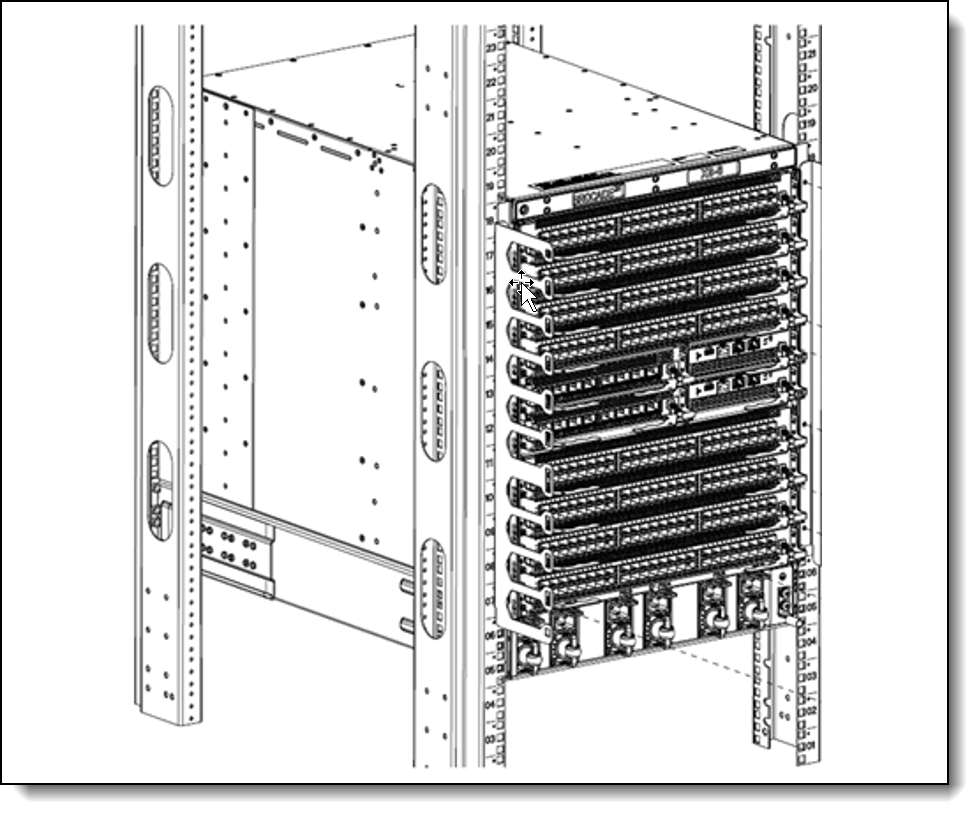
Both X8 Directors come standard with a four-post adjustable 27" to 31" rack mount kit. For clients that might require short rack depths an optional four-post adjustable 22" to 27" rack mount kit is available (Part # 4XF7B07478). No mid-mount kit offering for Gen 8 Directors.
The X8 Director rack mount kits are shown in the following figure.
Physical specifications
The X8 Directors have the following dimensions and weight:
Dimensions:
- X8-8 Director
- Height: 61.8 cm (24.3 in., 14U)
- Width: 44.2 cm (17.4 in.)
- Depth: 68.7 cm (27 in.)
- X8-4 Director
- Height: 39.6 cm (15.6 in., 9U)
- Width: 44.2 cm (17.4 in.)
- Depth: 68.7 cm (27 in.)
Weight:
- X8-8 Director
- 45.2 kg (99.6 lb) for chassis
- 116.8 kg (257.5 lb) maximum fully populated configuration
- X8-4 Director
- 39.2 kg (86.4 lb) for chassis
- 83.4 kg (183.9 lb) maximum fully populated configuration
Operating environment
Temperature and humidity, Electrical requirements, and Heat output Information can be found in the X8-4 and X8-8 Director Hardware Installation Guide. https://www.broadcom.com/products/fibre-channel-networking/directors/x8-directors
Warranty upgrades and post-warranty support
The X8 Directors have a three-year warranty.
Our global network of regional support centers offers consistent, local-language support enabling you to vary response times and level of service to match the criticality of your support needs:
- Standard Next Business Day – Best choice for non-essential systems requiring simple maintenance.
- Premier Next Business Day – Best choice for essential systems requiring technical expertise from senior-level Lenovo engineers.
- Premier 24x7 4-Hour Response – Best choice for systems where maximum uptime is critical.
- Premier Enhanced Storage Support 24x7 4-Hour Response – Best choice for storage systems where maximum uptime is critical.
For more information, consult the brochure Lenovo Operational Support Services for Data Centers Services.
Services
Lenovo Data Center Services empower you at every stage of your IT lifecycle. From expert advisory and strategic planning to seamless deployment and ongoing support, we ensure your infrastructure is built for success. Our comprehensive services accelerate time to value, minimize downtime, and free your IT staff to focus on driving innovation and business growth.
Note: Some service options may not be available in all markets or regions. For more information, go to https://lenovolocator.com/. For information about Lenovo service upgrade offerings that are available in your region, contact your local Lenovo sales representative or business partner.
In this section:
- Lenovo Advisory Services
- Lenovo Plan & Design Services
- Lenovo Deployment, Migration, and Configuration Services
- Lenovo Support Services
- Lenovo Managed Services
- Lenovo Sustainability Services
Lenovo Advisory Services
Lenovo Advisory Services simplify the planning process, enabling customers to build future-proofed strategies in as little as six weeks. Consultants provide guidance on projects including VM migration, storage, backup and recovery, and cost management to accelerate time to value, improve cost efficiency, and build a flexibly scalable foundation.
- Assessment Services
An Assessment helps solve your IT challenges through an onsite, multi-day session with a Lenovo technology expert. We perform a tools-based assessment which provides a comprehensive and thorough review of a company's environment and technology systems. In addition to the technology based functional requirements, the consultant also discusses and records the non-functional business requirements, challenges, and constraints. Assessments help organizations like yours, no matter how large or small, get a better return on your IT investment and overcome challenges in the ever-changing technology landscape.
- Design Services
Professional Services consultants perform infrastructure design and implementation planning to support your strategy. The high-level architectures provided by the assessment service are turned into low level designs and wiring diagrams, which are reviewed and approved prior to implementation. The implementation plan will demonstrate an outcome-based proposal to provide business capabilities through infrastructure with a risk-mitigated project plan.
Lenovo Plan & Design Services
Unlock faster time to market with our tailored, strategic design workshops to align solution approaches with your business goals and technical requirements. Leverage our deep solution expertise and end-to-end delivery partnership to meet your goals efficiently and effectively.
Lenovo Deployment, Migration, and Configuration Services
Optimize your IT operations by shifting labor-intensive functions to Lenovo's skilled technicians for seamless on-site or remote deployment, configuration, and migration. Enjoy peace of mind, faster time to value, and comprehensive knowledge sharing with your IT staff, backed by our best-practice methodology.
- Deployment Services for Storage and ThinkAgile
A comprehensive range of remote and onsite options tailored specifically for your business needs to ensure your storage and ThinkAgile hardware are fully operational from the start.
- Hardware Installation Services
A full-range, comprehensive setup for your hardware, including unpacking, inspecting, and positioning components to ensure your equipment is operational and error-free for the most seamless and efficient installation experience, so you can quickly benefit from your investments.
- DM/DG File Migration Services
Take the burden of file migration from your IT’s shoulders. Our experts will align your requirements and business objectives to the migration plans while coordinating with your team to plan and safely execute the data migration to your storage platforms.
- DM/DG/DE Health Check Services
Our experts perform proactive checks of your Firmware and system health to ensure your machines are operating at peak and optimal efficiency to maximize up-time, avoid system failures, ensure the security of IT solutions and simplify maintenance.
- Factory Integrated Services
A suite of value-added offerings provided during the manufacturing phase of a server or storage system that reduces time to value. These services aim at improving your hardware deployment experience and enhance the quality of a standard configuration before it arrives at your facility.
Lenovo Support Services
In addition to response time options for hardware parts, repairs, and labor, Lenovo offers a wide array of additional support services to ensure your business is positioned for success and longevity. Our goal is to reduce your capital outlays, mitigate your IT risks, and accelerate your time to productivity.
- Premier Support for Data Centers
Your direct line to the solution that promises the best, most comprehensive level of support to help you fully unlock the potential of your data center.
- Premier Enhanced Storage Support (PESS)
Gain all the benefits of Premier Support for Data Centers, adding dedicated storage specialists and resources to elevate your storage support experience to the next level.
- Committed Service Repair (CSR)
Our commitment to ensuring the fastest, most seamless resolution times for mission-critical systems that require immediate attention to ensure minimal downtime and risk for your business. This service is only available for machines under the Premier 4-Hour Response SLA.
- Multivendor Support Services (MVS)
Your single point of accountability for resolution support across vast range of leading Server, Storage, and Networking OEMs, allowing you to manage all your supported infrastructure devices seamlessly from a single source.
- Keep Your Drive (KYD)
Protect sensitive data and maintain compliance with corporate retention and disposal policies to ensure your data is always under your control, regardless of the number of drives that are installed in your Lenovo server.
- Technical Account Manager (TAM)
Your single point of contact to expedite service requests, provide status updates, and furnish reports to track incidents over time, ensuring smooth operations and optimized performance as your business grows.
- Enterprise Software Support (ESS)
Gain comprehensive, single-source, and global support for a wide range of server operating systems and Microsoft server applications.
For more information, consult the brochure Lenovo Operational Support Services for Data Centers.
Lenovo Managed Services
Achieve peak efficiency, high security, and minimal disruption with Lenovo's always-on Managed Services. Our real-time monitoring, 24x7 incident response, and problem resolution ensure your infrastructure operates seamlessly. With quarterly health checks for ongoing optimization and innovation, Lenovo's remote active monitoring boosts end-user experience and productivity by keeping your data center's hardware performing at its best.
Lenovo Managed Services provides continuous 24x7 remote monitoring (plus 24x7 call center availability) and proactive management of your data center using state-of-the-art tools, systems, and practices by a team of highly skilled and experienced Lenovo services professionals.
Quarterly reviews check error logs, verify firmware & OS device driver levels, and software as needed. We’ll also maintain records of latest patches, critical updates, and firmware levels, to ensure you systems are providing business value through optimized performance.
Lenovo Sustainability Services
- Asset Recovery Services
Lenovo Asset Recovery Services (ARS) provides a secure, seamless solution for managing end-of-life IT assets, ensuring data is safely sanitized while contributing to a more circular IT lifecycle. By maximizing the reuse or responsible recycling of devices, ARS helps businesses meet sustainability goals while recovering potential value from their retired equipment. For more information, see the Asset Recovery Services offering page.
- CO2 Offset Services
Lenovo’s CO2 Offset Services offer a simple and transparent way for businesses to take tangible action on their IT footprint. By integrating CO2 offsets directly into device purchases, customers can easily support verified climate projects and track their contributions, making meaningful progress toward their sustainability goals without added complexity.
- Lenovo Certified Refurbished
Lenovo Certified Refurbished offers a cost-effective way to support IT circularity without compromising on quality and performance. Each device undergoes rigorous testing and certification, ensuring reliable performance and extending its lifecycle. With Lenovo’s trusted certification, you gain peace of mind while making a more sustainable IT choice.
Lenovo TruScale
Lenovo TruScale XaaS is your set of flexible IT services that makes everything easier. Streamline IT procurement, simplify infrastructure and device management, and pay only for what you use – so your business is free to grow and go anywhere.
Lenovo TruScale is the unified solution that gives you simplified access to:
- The industry’s broadest portfolio – from pocket to cloud – all delivered as a service
- A single-contract framework for full visibility and accountability
- The global scale to rapidly and securely build teams from anywhere
- Flexible fixed and metered pay-as-you-go models with minimal upfront cost
- The growth-driving combination of hardware, software, infrastructure, and solutions – all from one single provider with one point of accountability.
For information about Lenovo TruScale offerings that are available in your region, contact your local Lenovo sales representative or business partner.
Regulatory compliance
The X8 Directors conform to the following regulations which can be found in the Hardware Installation Guide, available from the following web page:
https://www.broadcom.com/products/fibre-channel-networking/directors/x8-directors
Interoperability
For end-to-end storage configuration support, refer to the Lenovo Storage Interoperation Center (LSIC):
https://datacentersupport.lenovo.com/us/en/lsic
Use the LSIC to select the known components of your configuration and then get a list all other supported combinations, with details about supported hardware, firmware, operating systems, and drivers, plus any additional configuration notes. View results on screen or export them to Excel.
External storage systems
Lenovo offers the ThinkSystem DE Series, ThinkSystem DG Series, ThinkSystem DM Series and ThinkSystem DS Series external storage systems for high-performance storage. See the DE Series, DG Series and DM Series product guides for specific controller models, expansion enclosures and configuration options:
- ThinkSystem DE Series Storage
https://lenovopress.com/storage/thinksystem/de-series#rt=product-guide - ThinkSystem DS Series Storage
https://lenovopress.lenovo.com/storage/thinksystem/ds-series - ThinkSystem DM Series Storage
https://lenovopress.com/storage/thinksystem/dm-series#rt=product-guide - ThinkSystem DG Series Storage
https://lenovopress.com/storage/thinksystem/dg-series#rt=product-guide
External backup units
The following table lists the external backup options that are offered by Lenovo that can be used in Lenovo FC SAN solutions.
Note: Information provided in this section is for ordering reference purposes only. End-to-end LTO Ultrium configuration support for a particular tape backup unit must be verified through the System Storage Interoperation Center (SSIC):
http://www.ibm.com/systems/support/storage/ssic
For more information, see the list of Product Guides in the Tape Autoloaders and Libraries category:
https://lenovopress.com/storage/tape/library
Rack cabinets
The following table lists the supported rack cabinets.
For specifications about these racks, see the Lenovo Rack Cabinet Reference, available from:
https://lenovopress.com/lp1287-lenovo-rack-cabinet-reference
For more information, see the list of Product Guides in the Rack cabinets category:
https://lenovopress.com/servers/options/racks
Power distribution units
The following table lists the power distribution units (PDUs) that are offered by Lenovo.
| Part number |
Feature code |
Description |
ANZ
|
ASEAN
|
Brazil
|
EET
|
MEA
|
RUCIS
|
WE
|
HTK
|
INDIA
|
JAPAN
|
LA
|
NA
|
PRC
|
|---|---|---|---|---|---|---|---|---|---|---|---|---|---|---|---|
| 0U Basic PDUs | |||||||||||||||
| 4PU7A93176 | C0QH | 0U 36 C13 and 6 C19 Basic 32A 1 Phase PDU v2 | Y | Y | Y | Y | Y | Y | Y | Y | Y | N | Y | Y | Y |
| 4PU7A93169 | C0DA | 0U 36 C13 and 6 C19 Basic 32A 1 Phase PDU | Y | Y | Y | Y | Y | Y | Y | Y | Y | N | Y | Y | Y |
| 4PU7A93177 | C0QJ | 0U 24 C13/C15 and 24 C13/C15/C19 Basic 32A 3 Phase WYE PDU v2 | Y | Y | Y | Y | Y | Y | Y | Y | Y | Y | Y | Y | Y |
| 4PU7A93170 | CBVF | 0U 24 C13/C15 and 24 C13/C15/C19 Basic 32A 3 Phase WYE PDU | Y | Y | Y | Y | Y | Y | Y | Y | Y | Y | Y | Y | Y |
| 00YJ776 | ATZY | 0U 36 C13/6 C19 24A 1 Phase PDU | N | Y | Y | N | N | N | N | N | N | Y | Y | Y | N |
| 00YJ779 | ATZX | 0U 21 C13/12 C19 48A 3 Phase PDU | N | N | Y | N | N | N | Y | N | N | Y | Y | Y | N |
| 00YJ777 | ATZZ | 0U 36 C13/6 C19 32A 1 Phase PDU | Y | Y | Y | Y | Y | Y | Y | Y | Y | N | N | Y | Y |
| 00YJ778 | AU00 | 0U 21 C13/12 C19 32A 3 Phase PDU | Y | Y | N | Y | Y | Y | Y | Y | Y | N | N | Y | Y |
| 0U Switched and Monitored PDUs | |||||||||||||||
| 4PU7A93181 | C0QN | 0U 21 C13/C15 and 21 C13/C15/C19 Switched and Monitored 48A 3 Phase Delta PDU v2 (60A derated) | N | Y | N | N | N | N | N | Y | N | Y | N | Y | N |
| 4PU7A93174 | CBVJ | 0U 21 C13/C15 and 21 C13/C15/C19 Switched and Monitored 60A 3 Phase Delta PDU | Y | Y | Y | Y | Y | Y | Y | Y | Y | Y | Y | Y | Y |
| 4PU7A93178 | C0QK | 0U 20 C13 and 4 C19 Switched and Monitored 32A 1 Phase PDU v2 | Y | Y | Y | Y | Y | Y | Y | Y | Y | N | Y | Y | Y |
| 4PU7A93171 | C0D8 | 0U 20 C13 and 4 C19 Switched and Monitored 32A 1 Phase PDU | Y | Y | Y | Y | Y | Y | Y | Y | Y | N | Y | Y | Y |
| 4PU7A93182 | C0QP | 0U 18 C13/C15 and 18 C13/C15/C19 Switched and Monitored 63A 3 Phase WYE PDU v2 | Y | Y | Y | Y | Y | Y | Y | Y | Y | Y | Y | Y | Y |
| 4PU7A93175 | C0CS | 0U 18 C13/C15 and 18 C13/C15/C19 Switched and Monitored 63A 3 Phase WYE PDU | Y | Y | Y | Y | Y | Y | Y | Y | Y | N | Y | Y | Y |
| 4PU7A93180 | C0QM | 0U 18 C13/C15 and 18 C13/C15/C19 Switched and Monitored 32A 3 Phase WYE PDU v2 | Y | Y | Y | Y | Y | Y | Y | Y | Y | Y | Y | Y | Y |
| 4PU7A93173 | CBVH | 0U 18 C13/C15 and 18 C13/C15/C19 Switched and Monitored 32A 3 Phase WYE PDU | Y | Y | Y | Y | Y | Y | Y | Y | Y | Y | Y | Y | Y |
| 4PU7A93179 | C0QL | 0U 16 C13/C15 and 16 C13/C15/C19 Switched and Monitored 24A 1 Phase PDU v2 (30A derated) | N | Y | N | N | N | N | N | Y | N | Y | N | Y | N |
| 4PU7A93172 | CBVG | 0U 16 C13/C15 and 16 C13/C15/C19 Switched and Monitored 30A 1 Phase PDU | Y | Y | Y | Y | Y | Y | Y | Y | Y | Y | Y | Y | Y |
| 00YJ783 | AU04 | 0U 12 C13/12 C19 Switched and Monitored 48A 3 Phase PDU | N | N | Y | N | N | N | Y | N | N | Y | Y | Y | N |
| 00YJ781 | AU03 | 0U 20 C13/4 C19 Switched and Monitored 24A 1 Phase PDU | N | N | Y | N | Y | N | Y | N | N | Y | Y | Y | N |
| 00YJ782 | AU02 | 0U 18 C13/6 C19 Switched and Monitored 32A 3 Phase PDU | Y | Y | Y | Y | Y | Y | Y | Y | Y | N | Y | N | Y |
| 00YJ780 | AU01 | 0U 20 C13/4 C19 Switched and Monitored 32A 1 Phase PDU | Y | Y | Y | Y | Y | Y | Y | Y | Y | N | Y | N | Y |
| 1U Switched and Monitored PDUs | |||||||||||||||
| 4PU7A90808 | C0D4 | 1U 18 C19/C13 Switched and monitored 48A 3P WYE PDU V2 ETL | N | N | N | N | N | N | N | Y | N | Y | Y | Y | N |
| 4PU7A81117 | BNDV | 1U 18 C19/C13 switched and monitored 48A 3P WYE PDU - ETL | N | N | N | N | N | N | N | N | N | N | N | Y | N |
| 4PU7A90809 | C0DE | 1U 18 C19/C13 Switched and monitored 48A 3P WYE PDU V2 CE | Y | Y | Y | Y | Y | Y | Y | Y | Y | Y | Y | N | Y |
| 4PU7A81118 | BNDW | 1U 18 C19/C13 switched and monitored 48A 3P WYE PDU – CE | Y | Y | Y | Y | Y | Y | Y | Y | Y | Y | Y | N | Y |
| 4PU7A90810 | C0DD | 1U 18 C19/C13 Switched and monitored 80A 3P Delta PDU V2 | N | N | N | N | N | N | N | Y | N | Y | Y | Y | N |
| 4PU7A77467 | BLC4 | 1U 18 C19/C13 Switched and Monitored 80A 3P Delta PDU | N | N | N | N | N | N | N | N | N | Y | N | Y | N |
| 4PU7A90811 | C0DC | 1U 12 C19/C13 Switched and monitored 32A 3P WYE PDU V2 | Y | Y | Y | Y | Y | Y | Y | Y | Y | Y | Y | Y | Y |
| 4PU7A77468 | BLC5 | 1U 12 C19/C13 switched and monitored 32A 3P WYE PDU | Y | Y | Y | Y | Y | Y | Y | Y | Y | Y | Y | Y | Y |
| 4PU7A90812 | C0DB | 1U 12 C19/C13 Switched and monitored 60A 3P Delta PDU V2 | N | N | N | N | N | N | N | Y | N | Y | Y | Y | N |
| 4PU7A77469 | BLC6 | 1U 12 C19/C13 switched and monitored 60A 3P Delta PDU | N | N | N | N | N | N | N | N | N | N | N | Y | N |
| 46M4002 | 5896 | 1U 9 C19/3 C13 Switched and Monitored DPI PDU | Y | Y | Y | Y | Y | Y | Y | Y | Y | Y | Y | Y | Y |
| 46M4004 | 5894 | 1U 12 C13 Switched and Monitored DPI PDU | Y | Y | Y | Y | Y | Y | Y | Y | Y | Y | Y | Y | Y |
| 46M4003 | 5897 | 1U 9 C19/3 C13 Switched and Monitored 60A 3 Phase PDU | Y | Y | Y | Y | Y | Y | Y | Y | Y | Y | Y | Y | Y |
| 46M4005 | 5895 | 1U 12 C13 Switched and Monitored 60A 3 Phase PDU | Y | Y | Y | Y | Y | Y | Y | Y | Y | Y | Y | Y | Y |
| 1U C13 Enterprise PDUs (12x IEC 320 C13 outlets) | |||||||||||||||
| 39M2816 | 6030 | DPI C13 PDU+ | Y | Y | Y | Y | Y | Y | Y | Y | Y | Y | Y | Y | Y |
| 39Y8941 | 6010 | Enterprise C13 PDU | Y | Y | Y | Y | Y | Y | Y | Y | Y | Y | Y | Y | Y |
| 1U C19 Enterprise PDUs (6x IEC 320 C19 outlets) | |||||||||||||||
| 39Y8948 | 6060 | Enterprise C19 PDU | Y | Y | Y | Y | Y | Y | Y | Y | Y | Y | Y | Y | Y |
| 39Y8923 | 6061 | Enterprise C19 3 phase PDU (60a) | N | N | Y | N | N | N | Y | N | N | N | Y | Y | N |
| 1U Front-end PDUs (3x IEC 320 C19 outlets) | |||||||||||||||
| 39Y8938 | 6002 | DPI 30amp/125V Front-end PDU with NEMA L5-30P | Y | Y | Y | Y | Y | Y | Y | Y | Y | Y | Y | Y | Y |
| 39Y8939 | 6003 | DPI 30amp/250V Front-end PDU with NEMA L6-30P | Y | Y | Y | Y | Y | Y | Y | Y | Y | Y | Y | Y | Y |
| 39Y8934 | 6005 | DPI 32amp/250V Front-end PDU with IEC 309 2P+Gnd | Y | Y | Y | Y | Y | Y | Y | Y | Y | Y | Y | Y | Y |
| 39Y8940 | 6004 | DPI 60amp/250V Front-end PDU with IEC 309 2P+Gnd connector | Y | N | Y | Y | Y | Y | Y | N | N | Y | Y | Y | N |
| 39Y8935 | 6006 | DPI 63amp/250V Front-end PDU with IEC 309 2P+Gnd connector | Y | Y | Y | Y | Y | Y | Y | Y | Y | Y | Y | Y | Y |
| 1U NEMA PDUs (6x NEMA 5-15R outlets) | |||||||||||||||
| 39Y8905 | 5900 | DPI 100-127v PDU with Fixed Nema L5-15P line cord | Y | Y | Y | Y | Y | Y | Y | Y | Y | Y | Y | Y | Y |
| Line cords for 1U PDUs that ship without a line cord | |||||||||||||||
| 40K9611 | 6504 | 4.3m, 32A/380-415V, EPDU/IEC 309 3P+N+G 3ph wye (non-US) Line Cord | Y | Y | Y | Y | Y | Y | Y | Y | Y | Y | Y | Y | Y |
| 40K9612 | 6502 | 4.3m, 32A/230V, EPDU to IEC 309 P+N+G (non-US) Line Cord | Y | Y | Y | Y | Y | Y | Y | Y | Y | Y | Y | Y | Y |
| 40K9613 | 6503 | 4.3m, 63A/230V, EPDU to IEC 309 P+N+G (non-US) Line Cord | Y | Y | Y | Y | Y | Y | Y | Y | Y | Y | Y | Y | Y |
| 40K9614 | 6500 | 4.3m, 30A/208V, EPDU to NEMA L6-30P (US) Line Cord | Y | Y | Y | Y | Y | Y | Y | Y | Y | Y | Y | Y | Y |
| 40K9615 | 6501 | 4.3m, 60A/208V, EPDU to IEC 309 2P+G (US) Line Cord | N | N | Y | N | N | N | Y | N | N | Y | Y | Y | N |
| 40K9617 | 6505 | 4.3m, 32A/230V, Souriau UTG to AS/NZS 3112 (Aus/NZ) Line Cord | Y | Y | Y | Y | Y | Y | Y | Y | Y | Y | Y | Y | Y |
| 40K9618 | 6506 | 4.3m, 32A/250V, Souriau UTG Female to KSC 8305 (S. Korea) Line Cord | Y | Y | Y | Y | Y | Y | Y | Y | Y | Y | Y | Y | Y |
For more information, see the Lenovo Press documents in the PDU category:
https://lenovopress.com/servers/options/pdu
| Supported markets | Unsupported markets |
|---|---|
|
|
| Supported markets | Unsupported markets |
|---|---|
|
(None) |
| Supported markets | Unsupported markets |
|---|---|
|
|
| Supported markets | Unsupported markets |
|---|---|
|
(None) |
| Supported markets | Unsupported markets |
|---|---|
|
(None) |
| Supported markets | Unsupported markets |
|---|---|
|
(None) |
| Supported markets | Unsupported markets |
|---|---|
|
(None) |
| Supported markets | Unsupported markets |
|---|---|
|
(None) |
| Supported markets | Unsupported markets |
|---|---|
| (None) |
|
| Supported markets | Unsupported markets |
|---|---|
| (None) |
|
| Supported markets | Unsupported markets |
|---|---|
| (None) |
|
| Supported markets | Unsupported markets |
|---|---|
|
|
| Supported markets | Unsupported markets |
|---|---|
|
|
| Supported markets | Unsupported markets |
|---|---|
|
|
| Supported markets | Unsupported markets |
|---|---|
|
|
| Supported markets | Unsupported markets |
|---|---|
|
|
| Supported markets | Unsupported markets |
|---|---|
| (None) |
|
| Supported markets | Unsupported markets |
|---|---|
| (None) |
|
| Supported markets | Unsupported markets |
|---|---|
|
(None) |
| Supported markets | Unsupported markets |
|---|---|
|
(None) |
| Supported markets | Unsupported markets |
|---|---|
|
(None) |
| Supported markets | Unsupported markets |
|---|---|
|
(None) |
| Supported markets | Unsupported markets |
|---|---|
|
|
| Supported markets | Unsupported markets |
|---|---|
|
(None) |
| Supported markets | Unsupported markets |
|---|---|
|
(None) |
| Supported markets | Unsupported markets |
|---|---|
|
(None) |
| Supported markets | Unsupported markets |
|---|---|
|
|
| Supported markets | Unsupported markets |
|---|---|
|
(None) |
| Supported markets | Unsupported markets |
|---|---|
|
(None) |
| Supported markets | Unsupported markets |
|---|---|
|
(None) |
| Supported markets | Unsupported markets |
|---|---|
|
(None) |
| Supported markets | Unsupported markets |
|---|---|
|
(None) |
| Supported markets | Unsupported markets |
|---|---|
| (None) |
|
| Supported markets | Unsupported markets |
|---|---|
| (None) |
|
| Supported markets | Unsupported markets |
|---|---|
|
(None) |
| Supported markets | Unsupported markets |
|---|---|
|
(None) |
| Supported markets | Unsupported markets |
|---|---|
| (None) |
|
| Supported markets | Unsupported markets |
|---|---|
|
|
| Supported markets | Unsupported markets |
|---|---|
|
|
| Supported markets | Unsupported markets |
|---|---|
|
|
| Supported markets | Unsupported markets |
|---|---|
|
|
| Supported markets | Unsupported markets |
|---|---|
|
|
| Supported markets | Unsupported markets |
|---|---|
|
|
| Supported markets | Unsupported markets |
|---|---|
|
|
| Supported markets | Unsupported markets |
|---|---|
| (None) |
|
| Supported markets | Unsupported markets |
|---|---|
| (None) |
|
| Supported markets | Unsupported markets |
|---|---|
| (None) |
|
| Supported markets | Unsupported markets |
|---|---|
| (None) |
|
| Supported markets | Unsupported markets |
|---|---|
|
|
| Supported markets | Unsupported markets |
|---|---|
|
|
| Supported markets | Unsupported markets |
|---|---|
|
|
| Supported markets | Unsupported markets |
|---|---|
|
|
| Supported markets | Unsupported markets |
|---|---|
| (None) |
|
| Supported markets | Unsupported markets |
|---|---|
| (None) |
|
| Supported markets | Unsupported markets |
|---|---|
| (None) |
|
| Supported markets | Unsupported markets |
|---|---|
| (None) |
|
| Supported markets | Unsupported markets |
|---|---|
|
|
| Supported markets | Unsupported markets |
|---|---|
|
|
| Supported markets | Unsupported markets |
|---|---|
|
|
| Supported markets | Unsupported markets |
|---|---|
|
|
| Supported markets | Unsupported markets |
|---|---|
| (None) |
|
| Supported markets | Unsupported markets |
|---|---|
| (None) |
|
| Supported markets | Unsupported markets |
|---|---|
| (None) |
|
| Supported markets | Unsupported markets |
|---|---|
| (None) |
|
| Supported markets | Unsupported markets |
|---|---|
|
|
| Supported markets | Unsupported markets |
|---|---|
|
|
| Supported markets | Unsupported markets |
|---|---|
|
|
| Supported markets | Unsupported markets |
|---|---|
|
|
| Supported markets | Unsupported markets |
|---|---|
|
|
| Supported markets | Unsupported markets |
|---|---|
|
|
| Supported markets | Unsupported markets |
|---|---|
|
|
| Supported markets | Unsupported markets |
|---|---|
|
|
| Supported markets | Unsupported markets |
|---|---|
|
|
| Supported markets | Unsupported markets |
|---|---|
|
|
| Supported markets | Unsupported markets |
|---|---|
|
|
| Supported markets | Unsupported markets |
|---|---|
|
|
| Supported markets | Unsupported markets |
|---|---|
|
|
| Supported markets | Unsupported markets |
|---|---|
|
|
| Supported markets | Unsupported markets |
|---|---|
| (None) |
|
| Supported markets | Unsupported markets |
|---|---|
|
|
| Supported markets | Unsupported markets |
|---|---|
|
|
| Supported markets | Unsupported markets |
|---|---|
|
|
| Supported markets | Unsupported markets |
|---|---|
|
|
| Supported markets | Unsupported markets |
|---|---|
|
|
| Supported markets | Unsupported markets |
|---|---|
|
|
| Supported markets | Unsupported markets |
|---|---|
|
|
| Supported markets | Unsupported markets |
|---|---|
|
|
| Supported markets | Unsupported markets |
|---|---|
|
|
| Supported markets | Unsupported markets |
|---|---|
|
|
| Supported markets | Unsupported markets |
|---|---|
|
|
| Supported markets | Unsupported markets |
|---|---|
|
|
| Supported markets | Unsupported markets |
|---|---|
|
|
| Supported markets | Unsupported markets |
|---|---|
|
|
| Supported markets | Unsupported markets |
|---|---|
|
|
| Supported markets | Unsupported markets |
|---|---|
|
|
| Supported markets | Unsupported markets |
|---|---|
|
|
| Supported markets | Unsupported markets |
|---|---|
|
|
| Supported markets | Unsupported markets |
|---|---|
|
|
| Supported markets | Unsupported markets |
|---|---|
|
|
| Supported markets | Unsupported markets |
|---|---|
|
|
| Supported markets | Unsupported markets |
|---|---|
| (None) |
|
| Supported markets | Unsupported markets |
|---|---|
|
|
| Supported markets | Unsupported markets |
|---|---|
|
|
| Supported markets | Unsupported markets |
|---|---|
|
|
| Supported markets | Unsupported markets |
|---|---|
|
|
| Supported markets | Unsupported markets |
|---|---|
|
|
Uninterruptible power supply units
The following table lists the uninterruptible power supply (UPS) units that are offered by Lenovo.
† Only available in China and the Asia Pacific market.
For more information, see the list of Product Guides in the UPS category:
https://lenovopress.com/servers/options/ups
Seller training courses
The following sales training courses are offered for employees and partners (login required). Courses are listed in date order.
-
Partner Technical Webinar - New Fibre Channel Switches and Directors
2025-11-24 | 60 minutes | Employees and Partners
DetailsPartner Technical Webinar - New Fibre Channel Switches and Directors
In this 60-minute replay, Mike Easterly, Broadcom Technical Development, shared the details on the newest Brocade Fibre Channel switches and directors: Gen 8. He described how the new switches have increased performance, improved manageability and are Quantum-safe.
Published: 2025-11-24
Tags: Storage
Length: 60 minutes
Course code: NOV2125Start the training:
Employee link: Grow@Lenovo
Partner link: Lenovo 360 Learning Center
Related publications and links
For more information, see the following resources:
- Lenovo FC SAN Switches product page:
https://www3.lenovo.com/us/en/data-center/storage/storage-area-network/fibre-channel-switches/c/san-fibre-channel-switches - Brocade X8-4 and X8-8 FC Director product publications:
https://www.broadcom.com/products/fibre-channel-networking/directors/x8-directors- Hardware Installation Guide
- Fabric OS Administration Guide
- Fabric OS Extension Configuration Guide
- Fabric OS Command Reference
- Fabric OS Message Reference
- Fabric OS MIB Reference
- Flow Vision Configuration Guide
- FOS and SANnav Downloads - https://support.lenovo.com/us/en/solutions/TT116
- TruFOS Certificates - https://support.lenovo.com/us/en/solutions/TT1149
- Fabric OS Release Support Matrix - https://docs.broadcom.com/doc/Brocade-SW-Support-RM
Trademarks
Lenovo and the Lenovo logo are trademarks or registered trademarks of Lenovo in the United States, other countries, or both. A current list of Lenovo trademarks is available on the Web at https://www.lenovo.com/us/en/legal/copytrade/.
The following terms are trademarks of Lenovo in the United States, other countries, or both:
Lenovo®
ThinkAgile®
ThinkSystem®
The following terms are trademarks of other companies:
UltraScale+™ and UltraScale™ are trademarks of Advanced Micro Devices, Inc.
Microsoft®, Excel®, and Georgia® are trademarks of Microsoft Corporation in the United States, other countries, or both.
IBM®, FICON®, and ibm.com® are trademarks of IBM in the United States, other countries, or both.
Other company, product, or service names may be trademarks or service marks of others.
Configure and Buy
Please select a locale
Full Change History
Course Detail
Employees Only Content
The content in this document with a is only visible to employees who are logged in. Logon using your Lenovo ITcode and password via Lenovo single-signon (SSO).
The author of the document has determined that this content is classified as Lenovo Internal and should not be normally be made available to people who are not employees or contractors. This includes partners, customers, and competitors. The reasons may vary and you should reach out to the authors of the document for clarification, if needed. Be cautious about sharing this content with others as it may contain sensitive information.
Any visitor to the Lenovo Press web site who is not logged on will not be able to see this employee-only content. This content is excluded from search engine indexes and will not appear in any search results.
For all users, including logged-in employees, this employee-only content does not appear in the PDF version of this document.
This functionality is cookie based. The web site will normally remember your login state between browser sessions, however, if you clear cookies at the end of a session or work in an Incognito/Private browser window, then you will need to log in each time.
If you have any questions about this feature of the Lenovo Press web, please email David Watts at dwatts@lenovo.com.


