

Top
Author
Published
9 Dec 2025Form Number
LP2345PDF size
10 pages, 1.2 MBSubscribed to LP2345.
Thank you for your feedback.
Abstract
Real-time object detection is increasingly central to modern AI applications, powering solutions in manufacturing, healthcare, retail, security, and smart cities. While GPUs have traditionally been required to achieve low-latency inference with models like YOLO, these systems introduce significant cost, power, and integration challenges. This paper demonstrates how Intel Xeon 6 processors can deliver GPU-class performance for YOLO object detection models entirely on CPU.
Introduction
Object detection models such as YOLO (You Only Look Once) have revolutionized computer vision by enabling rapid, accurate identification of objects within images and video streams. Known for their balance of speed and precision, YOLO models are widely used in applications where real-time responsiveness is critical including automated quality inspection, patient monitoring, retail analytics, and traffic management. Traditionally, achieving this level of performance has required deployment on GPU-based infrastructure, which can introduce high costs, power consumption, and integration complexity.
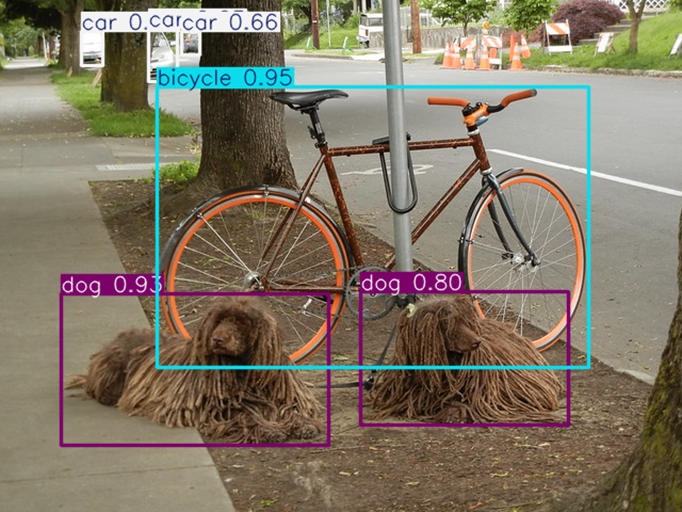
This paper demonstrates how Intel Xeon 6 processors, equipped with Advanced Matrix Extensions (AMX) and optimized using the OpenVINO toolkit, deliver exceptional performance for inferencing YOLO object detection models running entirely on CPUs. By combining AMX’s matrix computation capabilities with OpenVINO’s advanced model optimization, quantization, and threading features, Xeon 6 processors achieve exceptional inference speeds for real-time computer vision workloads. Through detailed performance analyses and deployment examples, this paper illustrates how Xeon 6 processors empower businesses to deploy high-performance AI solutions with lower total cost of ownership, proving that cutting-edge AI acceleration can now be achieved without GPUs.
ThinkSystem SR650 V4 and Intel Xeon 6
The Lenovo ThinkSystem SR650 V4, powered by the latest Intel Xeon 6 processors, provides a flexible and scalable foundation for next-generation AI workloads. Designed for performance, efficiency, and reliability, the SR650 V4 is ideal for organizations looking to deploy demanding multimodal applications across data center and enterprise environments.
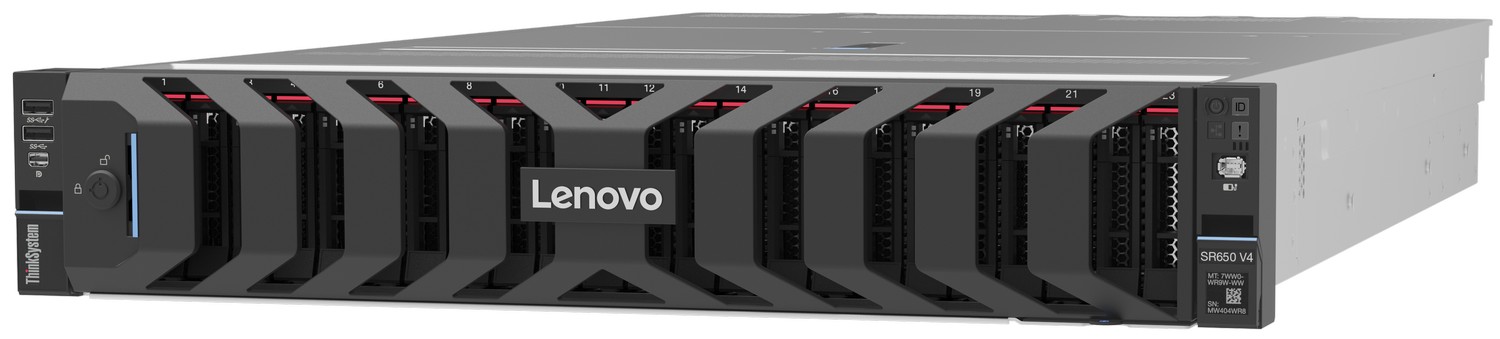
Figure 2. Lenovo ThinkSystem SR650 V4
At the heart of the SR650 V4, the Intel Xeon 6 delivers a leap in AI acceleration, thanks to features such as Advanced Matrix Extensions (AMX) and AVX-512, which unlock significant gains in transformer-based models. With expanded memory bandwidth, increased core density, and built-in support for AI instructions, Xeon 6 is engineered to meet the growing demands of multimodal workloads that integrate both vision and language reasoning.
When combined, Lenovo’s proven server engineering and Intel’s AI-optimized silicon create a platform that delivers:
- Scalable performance for large-scale LLM and vision workloads without the need for GPUs.
- Lower total cost of ownership (TCO) by leveraging existing CPU-based infrastructure.
- Enterprise-grade reliability for production deployments in mission-critical environments.
- Optimized AI performance with OpenVINO, ensuring seamless integration between hardware and software.
Together, the Lenovo SR650 V4 and Intel Xeon 6 offer enterprises the ability to deploy computer vision models at scale, with performance, efficiency, and flexibility that align with real-world business needs.
OpenVINO Acceleration Workflow
In the following steps we demonstrate how to run and accelerate a YOLO v8 model using OpenVINO.
1. Create Virtual Environment
It is recommended to install the uv package to create a virtual python environment to avoid dependency issues and quickly download needed python libraries. Run the following in your Linux terminal:
curl -LsSf https://astral.sh/uv/install.sh | sh
uv venv openvino-env
source openvino-env/bin/activate
2. Download Dependencies
Install the necessary python libraries including Ultralytics and Pytorch for running unoptimized YOLO models, as well as OpenVINO to optimize them. We also download a sample image.
uv pip install -q "openvino>=2024.0.0" "nncf>=2.9.0"
uv pip install -q "torch>=2.1" "torchvision>=0.16" "ultralytics==8.3.59" onnx tqdm opencv-python --extra-index-url https://download.pytorch.org/whl/cpu

wget "http://farm6.staticflickr.com/5030/5816311433_5bea494482_z.jpg"
3. Import Packages
Inside of a python script we can import the needed packages.
from ultralytics import YOLO
import openvino as ov
4. Import and Inference Ultralytics YOLO model
The Ultralytics library makes it simple to download and inference YOLO models. Here we demonstrate using the YOLOv8 nano model but a full list of compatible models is available here: https://docs.ultralytics.com/models/
# Downloads and initializes yolov8-nano model from Ultralytics
model = YOLO("yolov8n.pt")

# Inferences the model on the image we downloaded earlier and displays inference time stats
img_path = "5816311433_5bea494482_z.jpg"
res = model(img_path)
5. Export model to OpenVINO format
YOLO Ultralytics models can be easily exported to the OpenVINO format and quantized to fp16 or int8, a full set of options can be seen here: https://docs.ultralytics.com/modes/export/#arguments
model.export(format="openvino")
6. Load, prepare, and inference OpenVINO model
Here we load and compile the OpenVINO formatted model; note that while OpenVINO accelerates inferencing, it does not contain many of the features contained in the Ultralytics models such as pre-processing the inputs and post-processing the outputs. To simplify the code, we simply redefine the inference function of an Ultralytics model to call our OpenVINO model instead.
core = ov.Core()
ov_model = core.read_model(model_path)

compiled_model = core.compile_model(ov_model, "CPU")

# Redefining the Ultralytics model inferencing function
def infer(*args):
    result = compiled_model(args)
    return torch.from_numpy(result[0])
model.predictor.inference = infer
model.predictor.model.pt = False

res = model(img_path)
Xeon 6 YOLO Inferencing Performance
To evaluate the real-time object detection performance of Intel Xeon 6 processors, we benchmarked multiple YOLOv8 model sizes under a variety of conditions, comparing native PyTorch/Ultralytics execution to OpenVINO-optimized inference, as shown in the following figure.
The first experiment measured the benefit of converting an unoptimized Ultralytics model into OpenVINO IR format and enabling the Xeon 6 AMX acceleration pathways. The results showed up to a ~14× speedup in inference throughput when using the largest model size, underscoring the ability of Xeon 6 processors to fully utilize AMX instructions for deep-learning workloads.
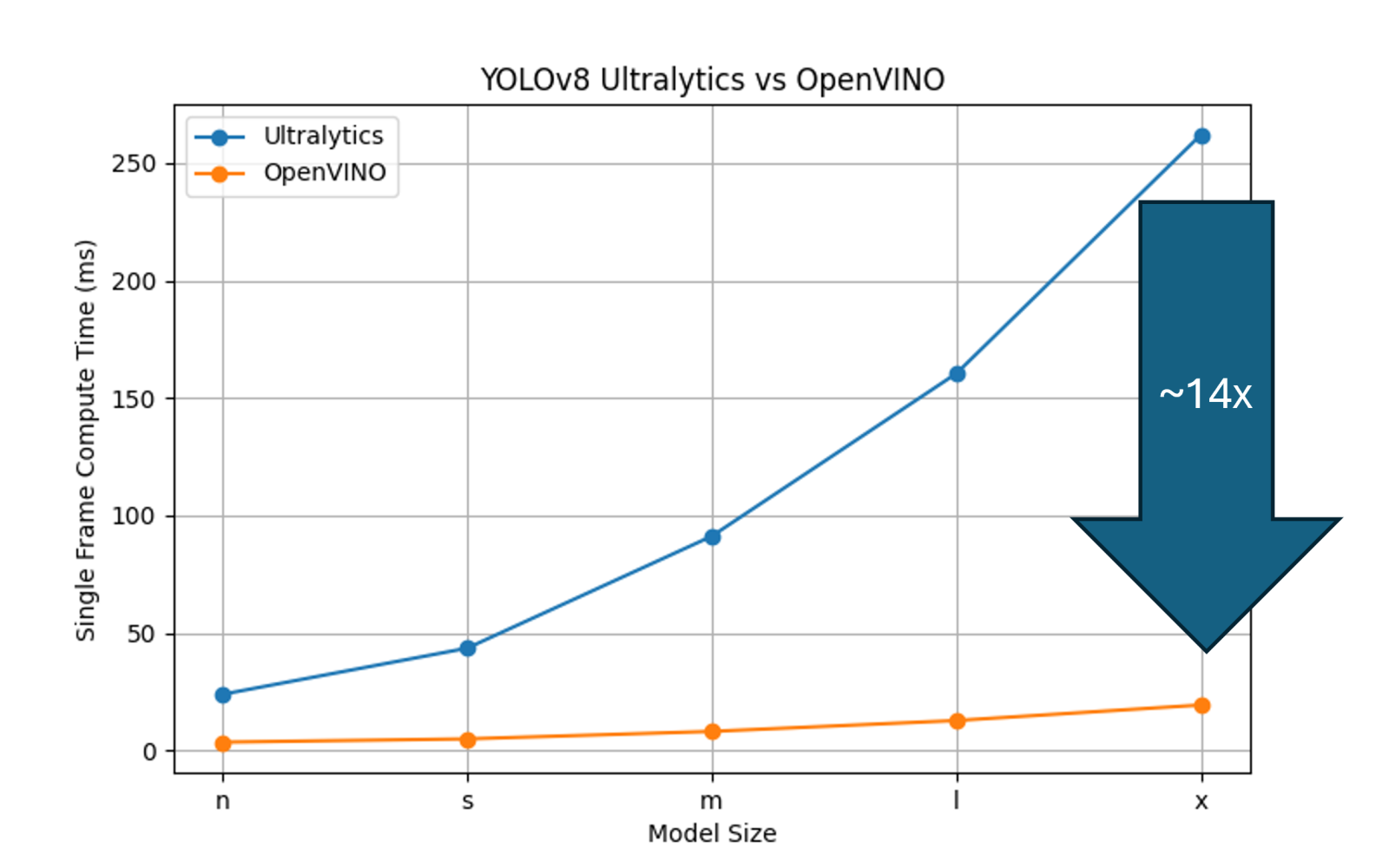
Figure 3: Comparison of the speedups AMX + OpenVINO models provide over native Pytorch/Ultralytics models
We then used Intel’s benchmark_app tool to assess performance across the full range of YOLOv8 sizes (n, s, m, l, x) and quantization levels (FP32, FP16, INT8), as shown in the figure below. In a single synchronous inference configuration representative of a single, real-time camera feed. All models comfortably exceeded the industry’s 60 FPS real-time threshold. Even the largest FP32 model delivered 61.6 fps, while the smallest models exceeded 350 fps. FP16 quantization reduced the model’s disk footprint by half without affecting speed. INT8 quantization provided significant acceleration only for the largest models, where throughput improved from 61.6 fps to 74.64 fps.
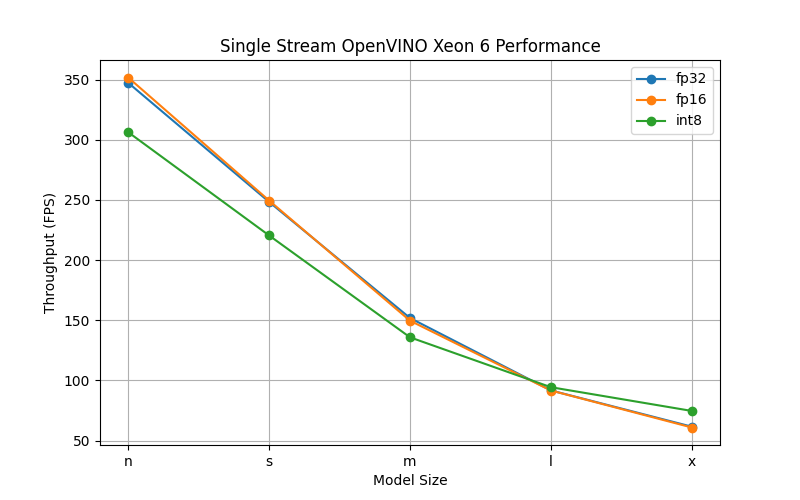
Figure 4: Single Inference Stream Throughput using OpenVINO
Finally, we evaluated throughput using multiple asynchronous inference requests, allowing OpenVINO to automatically tune the optimal request count for maximum performance, as shown in the figure below. This scenario highlights the Xeon 6 processor’s strengths in high-concurrency inference: the smallest YOLOv8 model approached 5,000 fps, while the largest FP32 model sustained 360 fps. Again, FP16 had negligible impact on performance, but INT8 quantization delivered a broader throughput improvement across model sizes.
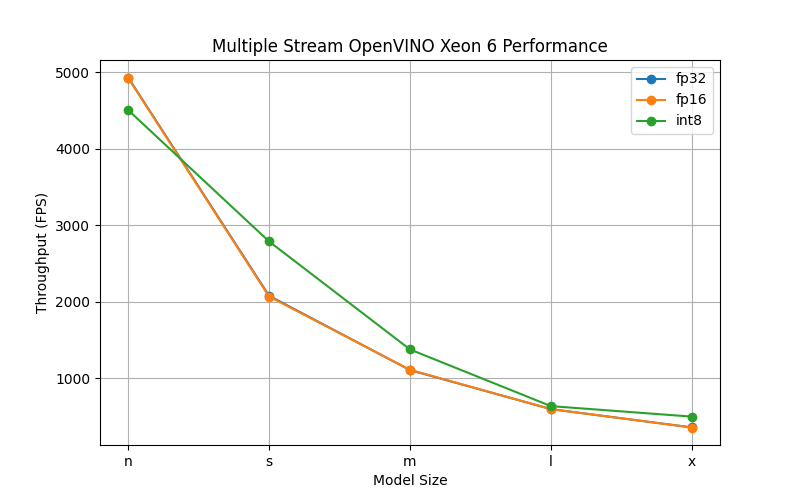
Figure 5: Multiple Stream Throughput using OpenVINO
These results demonstrate that Xeon 6 processors paired with OpenVINO can serve both real-time and high-density inferencing workloads entirely on CPU, offering exceptional performance scalability without requiring discrete accelerators.
Server configuration
The following table lists the components of the server we used for our tests.
Author
Eric Page is an AI Engineer at Lenovo. He has 6 years of practical experience developing Machine Learning solutions for various applications ranging from weather-forecasting to pose-estimation. He enjoys solving practical problems using data and AI/ML.
Trademarks
Lenovo and the Lenovo logo are trademarks or registered trademarks of Lenovo in the United States, other countries, or both. A current list of Lenovo trademarks is available on the Web at https://www.lenovo.com/us/en/legal/copytrade/.
The following terms are trademarks of Lenovo in the United States, other countries, or both:
Lenovo®
ThinkSystem®
The following terms are trademarks of other companies:
Intel®, the Intel logo, OpenVINO®, and Xeon® are trademarks of Intel Corporation or its subsidiaries.
Linux® is the trademark of Linus Torvalds in the U.S. and other countries.
Other company, product, or service names may be trademarks or service marks of others.
Configure and Buy
Please select a locale
Full Change History
Course Detail
Employees Only Content
The content in this document with a is only visible to employees who are logged in. Logon using your Lenovo ITcode and password via Lenovo single-signon (SSO).
The author of the document has determined that this content is classified as Lenovo Internal and should not be normally be made available to people who are not employees or contractors. This includes partners, customers, and competitors. The reasons may vary and you should reach out to the authors of the document for clarification, if needed. Be cautious about sharing this content with others as it may contain sensitive information.
Any visitor to the Lenovo Press web site who is not logged on will not be able to see this employee-only content. This content is excluded from search engine indexes and will not appear in any search results.
For all users, including logged-in employees, this employee-only content does not appear in the PDF version of this document.
This functionality is cookie based. The web site will normally remember your login state between browser sessions, however, if you clear cookies at the end of a session or work in an Incognito/Private browser window, then you will need to log in each time.
If you have any questions about this feature of the Lenovo Press web, please email David Watts at dwatts@lenovo.com.


