

Top
Author
Published
25 Nov 2025Form Number
LP2336PDF size
15 pages, 509 KBSubscribed to LP2336.
Thank you for your feedback.
Table of Contents
Abstract
The ThinkSystem M.2 N3002 Read Intensive NVMe PCIe 4.0 Industrial SSDs, in capacities up to 3.84TB, are high performance NVMe M.2 drives suitable operating system boot purposes and general data storage functions on ThinkSystem servers in environments up to 85°C.
This product guide provides essential presales information to understand the N3002 M.2 SSDs and their key features, specifications, and compatibility. This guide is intended for technical specialists, sales specialists, sales engineers, IT architects, and other IT professionals who want to learn more about the N3002 M.2 SSDs and consider their use in IT solutions.
Introduction
The ThinkSystem M.2 N3002 Read Intensive NVMe PCIe 4.0 Industrial SSDs, in capacities up to 3.84TB, are high performance NVMe M.2 drives suitable operating system boot purposes and general data storage functions on ThinkSystem servers in environments up to 85°C.
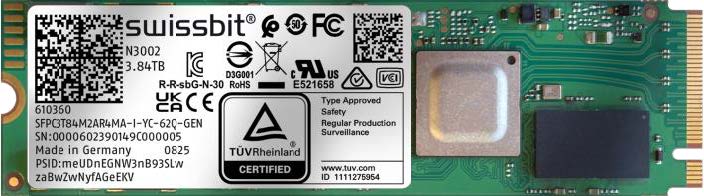
Figure 1. ThinkSystem M.2 N3002 Read Intensive NVMe PCIe 4.0 Industrial SSDs
Did you know?
The N3002 M.2 SSDs deliver performance for edge applications in environments with temperature from -40°C to 85°C. The NVMe controller and the newest 3D NAND flash technology provides robust, non-volatile storage solution for today’s edge computing applications.
Part number information
The following tables list the information for ordering part numbers and feature codes.
The part numbers include the following items:
- One M.2 drive
- Documentation flyer
Features
The ThinkSystem M.2 N3002 Read Intensive NVMe PCIe 4.0 Industrial SSDs have the following features:
- Based on the Swissbit N3002 family of industrial solid state drives
- TLC 3D NAND flash
- End-to-end data protection
- Thermal throttling/sensor
- On-Board Power Fail Protection (Power loss protection, PLP)
- ROHS-compliant
- Command sets: TRIM, S.M.A.R.T, NCQ
- TCG Opal 2.0 compliant self-encrypting drive (SED)
Read Intensive SSDs and Mixed Use SSDs have similar read and write IOPS performance, but the key difference between them is their endurance (or lifetime) — that is, how long they can perform write operations because SSDs have a finite number of program/erase (P/E) cycles. Read Intensive SSDs typically have a better cost per read IOPS ratio but lower endurance and performance compared to Mixed Use SSDs.
The TBW value assigned to a solid-state device is the total bytes of written data (based on the number of P/E cycles) that a drive can be guaranteed to complete (% of remaining P/E cycles = % of remaining TBW). Reaching this limit does not cause the drive to immediately fail. It simply denotes the maximum number of writes that can be guaranteed. A solid-state device will not fail upon reaching the specified TBW. At some point based on manufacturing variance margin, after surpassing the TBW value, the drive will reach the end-of-life point, at which the drive will go into a read-only mode.
For example, the N3002 1.92TB drive has an endurance of 1,620 TB of total bytes written (TBW). This means that for full operation over five years, write workload must be limited to no more than 888 GB of writes per day, which is equivalent to 0.5 full drive writes per day (DWPD). For the device to last three years, the drive write workload must be limited to no more than 1,479 GB of writes per day, which is equivalent to 0.8 full drive writes per day.
The benefits of drive encryption
Self-encrypting drives (SEDs) provide benefits in three main ways:
- By encrypting data on-the-fly at the drive level with no performance impact
- By providing instant secure erasure (cryptographic erasure, thereby making the data no longer readable)
- By enabling auto-locking to secure active data if a drive is misplaced or stolen from a system while in use
The following sections describe the benefits in more details.
Automatic encryption
It is vital that a company keep its data secure. With the threat of data loss due to physical theft or improper inventory practices, it is important that the data be encrypted. However, challenges with performance, scalability, and complexity have led IT departments to push back against security policies that require the use of encryption. In addition, encryption has been viewed as risky by those unfamiliar with key management, a process for ensuring a company can always decrypt its own data. Self-encrypting drives comprehensively resolve these issues, making encryption both easy and affordable.
When the self-encrypting drive is in normal use, its owner need not maintain authentication keys (otherwise known as credentials or passwords) in order to access the data on the drive. The self-encrypting drive will encrypt data being written to the drive and decrypt data being read from it, all without requiring an authentication key from the owner.
Drive retirement and disposal
When hard drives are retired and moved outside the physically protected data center into the hands of others, the data on those drives is put at significant risk. IT departments retire drives for a variety of reasons, including:
- Returning drives for warranty, repair, or expired lease agreements
- Removal and disposal of drives
- Repurposing drives for other storage duties
Nearly all drives eventually leave the data center and their owner's control. Corporate data resides on such drives, and when most leave the data center, the data they contain is still readable. Even data that has been striped across many drives in a RAID array is vulnerable to data theft because just a typical single stripe in today’s high-capacity arrays is large enough to expose for example, hundreds of names and bank account numbers.
In an effort to avoid data breaches and the ensuing customer notifications required by data privacy laws, companies use different methods to erase the data on retired drives before they leave the premises and potentially fall into the wrong hands. Current retirement practices that are designed to make data unreadable rely on significant human involvement in the process, and are thus subject to both technical and human failure.
The drawbacks of today’s drive retirement practices include the following:
- Overwriting drive data is expensive, tying up valuable system resources for days. No notification of completion is generated by the drive, and overwriting won’t cover reallocated sectors, leaving that data exposed.
- Methods that include degaussing or physically shredding a drive are expensive. It is difficult to ensure the degauss strength is optimized for the drive type, potentially leaving readable data on the drive. Physically shredding the drive is environmentally hazardous, and neither practice allows the drive to be returned for warranty or expired lease.
- Some companies have concluded the only way to securely retire drives is to keep them in their control, storing them indefinitely in warehouses. But this is not truly secure because a large volume of drives coupled with human involvement inevitably leads to some drives being lost or stolen.
- Professional disposal services is an expensive option and includes the cost of reconciling the services as well as internal reports and auditing. Transporting of the drives also has the potential of putting the data at risk.
Self-encrypting drives eliminate the need to overwrite, destroy, or store retired drives. When the drive is to be retired, it can be cryptographically erased, a process that is nearly instantaneous regardless of the capacity of the drive.
Instant secure erase
The self-encrypting drive provides instant data encryption key destruction via cryptographic erasure. When it is time to retire or repurpose the drive, the owner sends a command to the drive to perform a cryptographic erasure. Cryptographic erasure simply replaces the encryption key inside the encrypted drive, making it impossible to ever decrypt the data encrypted with the deleted key.
Self-encrypting drives reduce IT operating expenses by reducing asset control challenges and disposal costs. Data security with self-encrypting drives helps ensure compliance with privacy regulations without hindering IT efficiency. So called "Safe Harbor" clauses in government regulations allow companies to not have to notify customers of occurrences of data theft if that data was encrypted and therefore unreadable.
Furthermore, self-encrypting drives simplify decommissioning and preserve hardware value for returns and repurposing by:
- Eliminating the need to overwrite or destroy the drive
- Securing warranty returns and expired lease returns
- Enabling drives to be repurposed securely
Auto-locking
Insider theft or misplacement is a growing concern for businesses of all sizes; in addition, managers of branch offices and small businesses without strong physical security face greater vulnerability to external theft. Self-encrypting drives include a feature called auto-lock mode to help secure active data against theft.
Using a self-encrypting drive when auto-lock mode is enabled simply requires securing the drive with an authentication key. When secured in this manner, the drive’s data encryption key is locked whenever the drive is powered down. In other words, the moment the self-encrypting drive is switched off or unplugged, it automatically locks down the drive’s data.
When the self-encrypting drive is then powered back on, it requires authentication before being able to unlock its encryption key and read any data on the drive, thus protecting against misplacement and theft.
While using self-encrypting drives just for the instant secure erase is an extremely efficient and effective means to help securely retire a drive, using self-encrypting drives in auto-lock mode provides even more advantages. From the moment the drive or system is removed from the data center (with or without authorization), the drive is locked. No advance thought or action is required from the data center administrator to protect the data. This helps prevent a breach should the drive be mishandled and helps secure the data against the threat of insider or outside theft.
Technical specifications
The following tables present technical specifications for the N3002 M.2 SSDs.
Server support
The following tables list the ThinkSystem servers that are compatible.
Storage controller support
NVMe PCIe SSDs require a NVMe drive backplane and some form of PCIe connection to processors. PCIe connections can take the form of either an adapter (PCIe Interposer or PCIe extender) or simply a cable that connects to an onboard NVMe connector.
Consult the relevant server product guide for details about required components for NVMe drive support.
IBM SKLM Key Management support
To effectively manage a large deployment of SEDs in Lenovo servers, IBM Security Key Lifecycle Manager (SKLM) offers a centralized key management solution. Certain Lenovo servers support Features on Demand (FoD) license upgrades that enable SKLM support.
The following table lists the part numbers and feature codes to enable SKLM support in the management processor of the server.
The IBM Security Key Lifecycle Manager software is available from Lenovo using the ordering information listed in the following table.
The following tables list the ThinkSystem servers that are compatible with the FoD upgrades for SKLM.
Warranty
The N3002 M.2 SSDs carry a one-year, customer-replaceable unit (CRU) limited warranty. When the SSDs are installed in a supported server, these drives assume the system’s base warranty and any warranty upgrades.
Solid State Memory cells have an intrinsic, finite number of program/erase cycles that each cell can incur. As a result, each solid state device has a maximum amount of program/erase cycles to which it can be subjected. The warranty for Lenovo solid state drives (SSDs) is limited to drives that have not reached the maximum guaranteed number of program/erase cycles, as documented in the Official Published Specifications for the SSD product. A drive that reaches this limit may fail to operate according to its Specifications.
Physical specifications
The N3002 M.2 SSDs have the following physical specifications:
- Length: 80 mm
- Width: 22 mm
- Thickness: 3.8 mm
- Weight: 9g
Operating environment
The N3002 M.2 SSDs are supported in the following environment:
- Temperature, operating: -40 °C to 85 °C (-40 to 185 °F)
- Temperature, non-operating: -40 °C to 85 °C (-40 to 185 °F)
- Relative humidity: 85% (noncondensing)
Agency approvals
The N3002 M.2 SSDs conform to the following regulations:
- CE 2014/30/EU
- FCC 47 CFR Part 15
- UKCA S.I. 2016 No. 1091 and S.I. 2012 No. 3032
- RoHS 2011/65/EU with 2015/863/EU and 2017/2102/EU
- REACH 1907/2006/EU and 207/2011/EU
- WEEE 2012/19/EU
Related publications and links
For more information, see the following documents:
-
Lenovo ThinkSystem SSD Portfolio Comparison
https://lenovopress.com/lp1261-lenovo-thinksystem-ssd-portfolio - Swissbit product web page
https://www.swissbit.com/en/products/nand-flash-products/pcie-ssd-modules/
Trademarks
Lenovo and the Lenovo logo are trademarks or registered trademarks of Lenovo in the United States, other countries, or both. A current list of Lenovo trademarks is available on the Web at https://www.lenovo.com/us/en/legal/copytrade/.
The following terms are trademarks of Lenovo in the United States, other countries, or both:
Lenovo®
System x®
ThinkSystem®
The following terms are trademarks of other companies:
AMD is a trademark of Advanced Micro Devices, Inc.
Intel®, the Intel logo is a trademark of Intel Corporation or its subsidiaries.
IBM® and IBM Security® are trademarks of IBM in the United States, other countries, or both.
Other company, product, or service names may be trademarks or service marks of others.
Configure and Buy
Please select a locale
Full Change History
Course Detail
Employees Only Content
The content in this document with a is only visible to employees who are logged in. Logon using your Lenovo ITcode and password via Lenovo single-signon (SSO).
The author of the document has determined that this content is classified as Lenovo Internal and should not be normally be made available to people who are not employees or contractors. This includes partners, customers, and competitors. The reasons may vary and you should reach out to the authors of the document for clarification, if needed. Be cautious about sharing this content with others as it may contain sensitive information.
Any visitor to the Lenovo Press web site who is not logged on will not be able to see this employee-only content. This content is excluded from search engine indexes and will not appear in any search results.
For all users, including logged-in employees, this employee-only content does not appear in the PDF version of this document.
This functionality is cookie based. The web site will normally remember your login state between browser sessions, however, if you clear cookies at the end of a session or work in an Incognito/Private browser window, then you will need to log in each time.
If you have any questions about this feature of the Lenovo Press web, please email David Watts at dwatts@lenovo.com.


